Features Recruiting & Contracts Shift planning Time tracking Absences & vacation HR & Payroll AI & communication Industries HospitalityHotel industryEvents & cateringRetailCar repair shops & dealershipsMedical practices & MVZPharmaciesClinics & care homesHome Care & Ambulance ServicesDay-care & social servicesConstruction & TradesManufacturing & logisticsFacility & Security ServicesMunicipalities & public utilitiesOffice & administration
More
Pricing Guides Careers Log in / Try it free
Language
DeutschEnglishFrançaisEspañolItalianoNederlandsPolskiPortuguêsČeštinaDanskSvenskaSuomiΕλληνικάMagyarRomânăБългарскиHrvatskiSlovenčinaSlovenščinaEestiLietuviųLatviešuMaltiGaeilge
Presio / Shift Planning
Shift planning

The schedule knows
Can and may.

Plan shifts by dragging, see preferences and absences right in the schedule, get conflicts flagged automatically - and publish once everything's set.
Try it free See the live demo No credit card · cancellable monthly · no setup fee
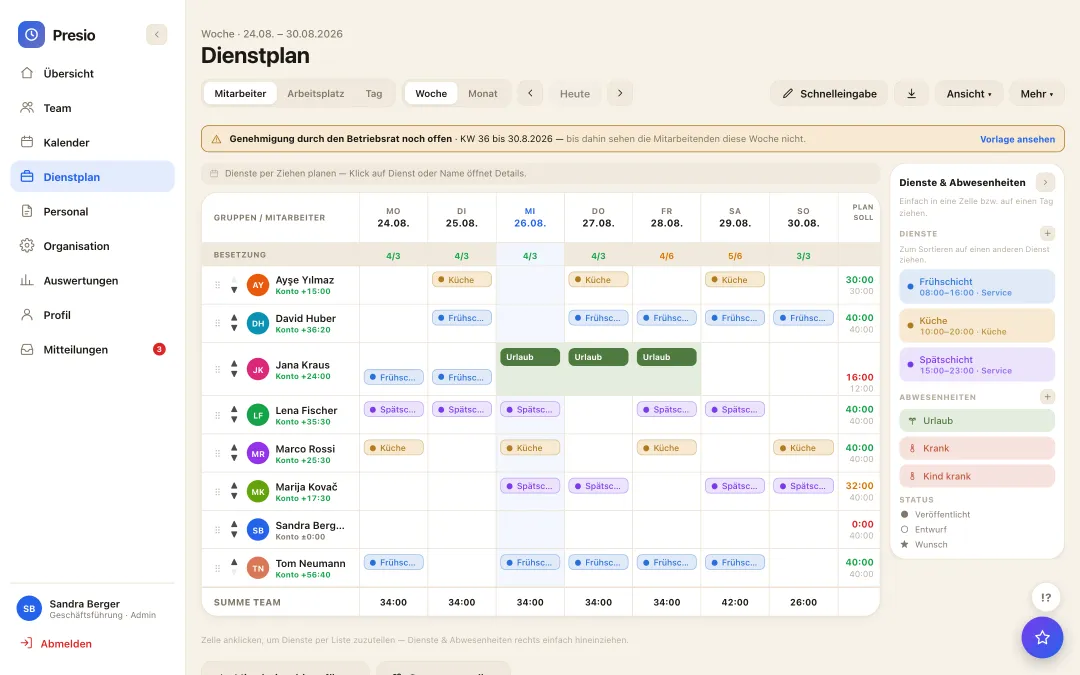
Presio-Dienstplan mit Besetzung, Qualifikationen und Konfliktprüfung
To try out

Assign shifts the way staffing actually demands

This is the real app with sample data - click through it yourself, e.g. “Schedule” on the left. The staffing row shows target/actual per day, and qualifications like “Shift lead” appear right next to the name - Presio flags gaps and conflicts before they show up on the floor.

Loading the real app …
Day view

Schedule across different workplaces

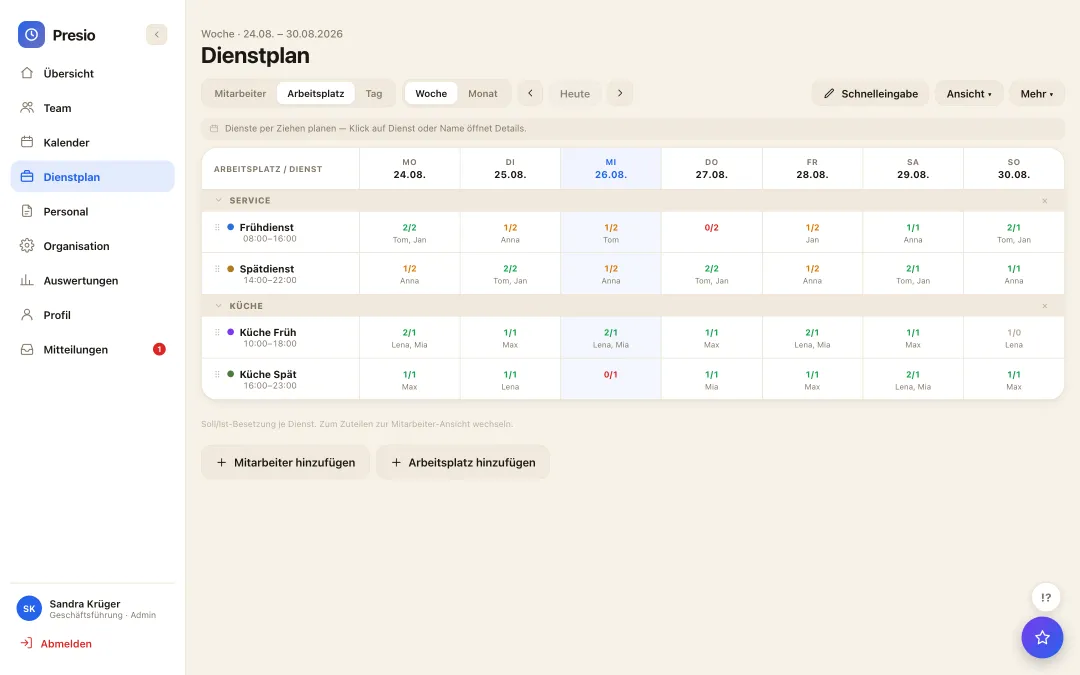
Switch from the weekly overview to the daily view and group by work area - service, kitchen or your own areas, each with its own staffing target and open shifts at a glance.

All features

Scheduling without paper or word of mouth.

Four viewsEmployee, workplace, daily, weekly and monthly views - every perspective just one click away.
Plan by draggingDrag shifts and absences from the sidebar into the schedule; quick entry fills whole weeks at once.
Preferences & AvailabilityEmployees enter their preferred shifts and availability - the planner sees them right in the cell.
Conflict checkMissing qualification, overscheduling, absence: the schedule flags conflicts before they show up in the business.
Draft → PublishThe team only sees the schedule once it's published - no confusion from work-in-progress versions.
Groups & staffingOrganize employees into groups, set target staffing per day - the header tallies it live.
Public holidays by federal stateBavarian public holidays are different from Berlin's: Presio knows them per employee and factors them into target hours.
My scheduleEveryone sees their own shifts and the team in the app - with a notification as soon as the schedule is published.
Shift swapHand off a shift to a colleague - as a request; the handover only happens after approval.
Shift Offer & Shift MarketplaceGap or sick call: offer the shift straight from the red cell - push to everyone suitable, whoever accepts first is scheduled, or you choose.
Temp Staffing & Partner InterfaceStaffing agencies see open shifts via API or webhook and submit their own workers - once confirmed, they count toward staffing immediately.
Multiple schedulesAmbulance service and school, bakery and pub: separate schedules with their own shifts and workplaces, people on one or several - everything in one account.
AI draft scheduleThe assistant builds the weekly schedule as a draft - from shifts, preferences and availability. It's only published once you click to release it.
Calendar export (.ics)Subscribe to shifts in your personal calendar - iPhone, Google, Outlook.
From the real product

One week, one glance: staffing by workplace

Grouped by workplace - service, kitchen or your own areas - with target/actual staffing per shift and day at a glance - click to enlarge.

Wochen-Dienstplan nach Arbeitsplatz gruppiert mit Soll/Ist-Besetzung je Schicht
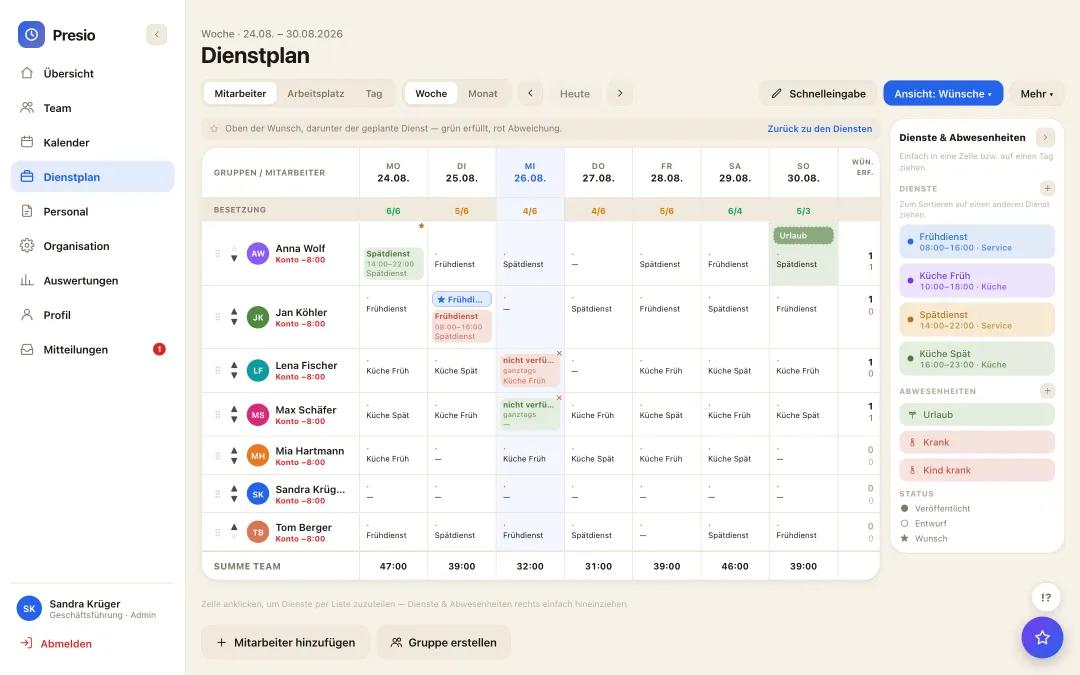
Wunschsicht im Dienstplan: Wunsch und geplanter Dienst im Vergleich, grün erfüllt und rot abweichend
Wish fulfilled Wish not fulfilled
Custom view

Wish and plan compared - at a glance

  • Green fulfilled, red deviating: every row shows the wish and the planned shift directly on top of each other.
  • Rate per employee: the "wishes fulfilled" column counts live while you plan.
  • One click back: one click back from the wish view into normal planning, without losing anything.
Frequently asked questions

Quick answers

Can employees see their colleagues' shifts too?

Yes - once published, employees see their team in the schedule (can be turned off). That way everyone knows who they're working with, without having to ask the planner.

What happens if someone is on vacation but gets scheduled anyway?

Approved absences block scheduling: the planner sees the vacation chip in the cell and gets a conflict warning if they try anyway.

Can employees state their preferences?

Yes. Preferred shifts and availability are entered in the app and appear directly in the planner's schedule - accepting them is one click.

The first time clock is running within ten minutes

Sign up, create your team, get started - try Presio free and with no obligation, no credit card needed.

Start your free trial