Features Recruiting & Contracts Shift planning Time tracking Absences & vacation HR & Payroll AI & communication Industries HospitalityHotel industryEvents & cateringRetailCar repair shops & dealershipsMedical practices & MVZPharmaciesClinics & care homesHome Care & Ambulance ServicesDay-care & social servicesConstruction & TradesManufacturing & logisticsFacility & Security ServicesMunicipalities & public utilitiesOffice & administration
More
Pricing Guides Careers Log in / Try it free
Language
DeutschEnglishFrançaisEspañolItalianoNederlandsPolskiPortuguêsČeštinaDanskSvenskaSuomiΕλληνικάMagyarRomânăБългарскиHrvatskiSlovenčinaSlovenščinaEestiLietuviųLatviešuMaltiGaeilge
Presio / Facility & Security Services
Industry · Facility & Security Services

Time tracking
for facility & security services

Whether it's cleaning or security: sites instead of an office, part-time instead of a fixed core team. Presio records time per site or beat, schedules rounds and round-the-clock shifts, and makes payroll prep run itself.

Try it free See the live demo No credit card · cancellable monthly · no setup fee
Sound familiar?

Everyday life without a system

Site slip

One sheet per site or beat, a different handwriting on every sheet.

24/7 on paper

Round-the-clock staffing on the wall chart - gaps get noticed too late.

Floater chaos

Who was deployed where today - cleaning or security? By month-end, nobody knows.

Presio turns every one of these points into a single step. Here's what that looks like:

Blitzblank Facility & Security Services · Kiosk
Kiosk mode

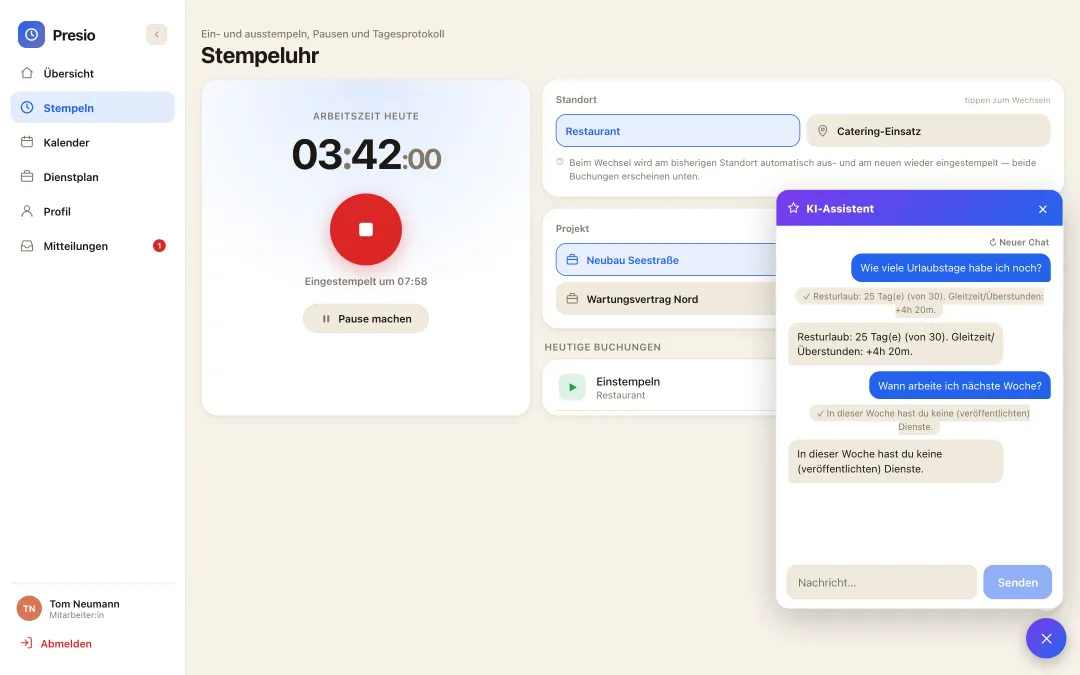
One tablet at the entrance - the whole team clocks in

No smartphone of your own needed: tap, PIN, done - and today's shift shows up right on the screen. Try it out:

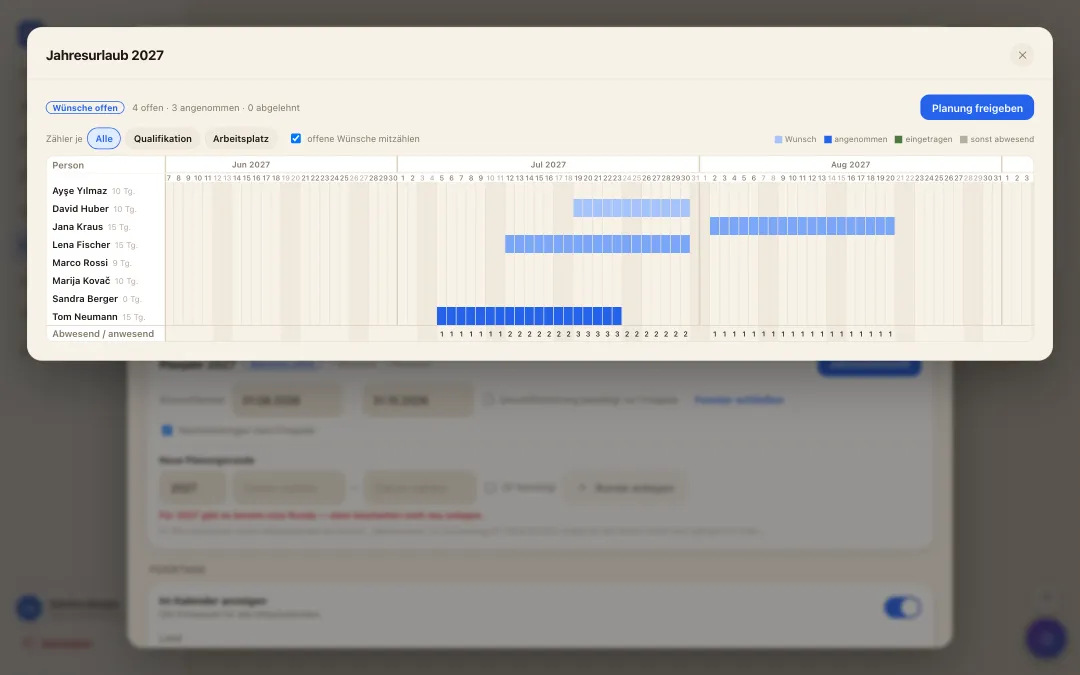
Jahresübersicht der Urlaubsplanung: alle Mitarbeitenden über das ganze Jahr, Wünsche als Balken und Zähler je Tag
annual vacation planning

A whole year of vacation - settled in one morning

  • Collect wishes instead of notes: While the wish window is open, everyone submits their periods for next year - with a priority and a reason, straight from the app.
  • Bottlenecks visible at once: The year overview shows for every day how many are missing and how many are in - optionally per qualification or workplace. Where it gets too tight, it turns red.
  • Release it, done: You drag periods with the mouse and release with a click - they become real approved vacation in the calendar. Late entries stay possible.
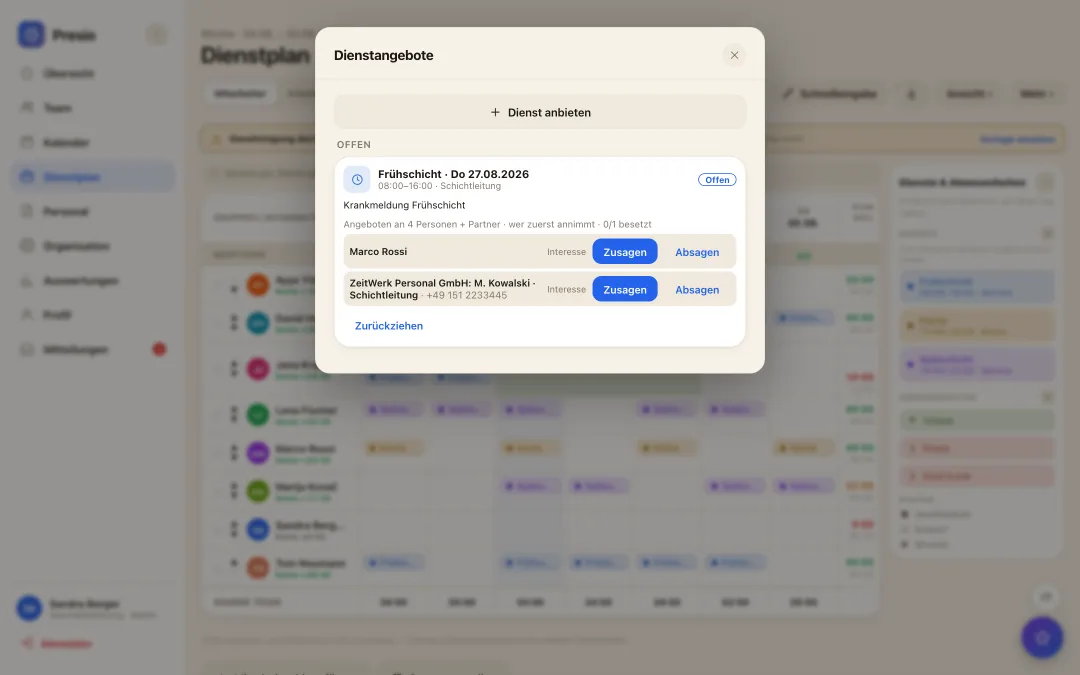
Shift offers & agency staff

Sick call at six - cover by half past

  • One click out of the gap: The red cell in the plan offers the shift to exactly the right people - filtered by qualification, pushed to their phone.
  • First to accept is scheduled: Or you collect who is interested and decide yourself. The shift then lands in the plan on its own.
  • Agency staff asked at the same time: Staffing agencies get the same offer through their own interface and report back their people - who count towards the required staffing, with no chain of phone calls.
Dienstangebot nach einer Krankmeldung: Angebot an passende Mitarbeitende und an eine Personaldienstleisterin, Zusagen im Vergleich
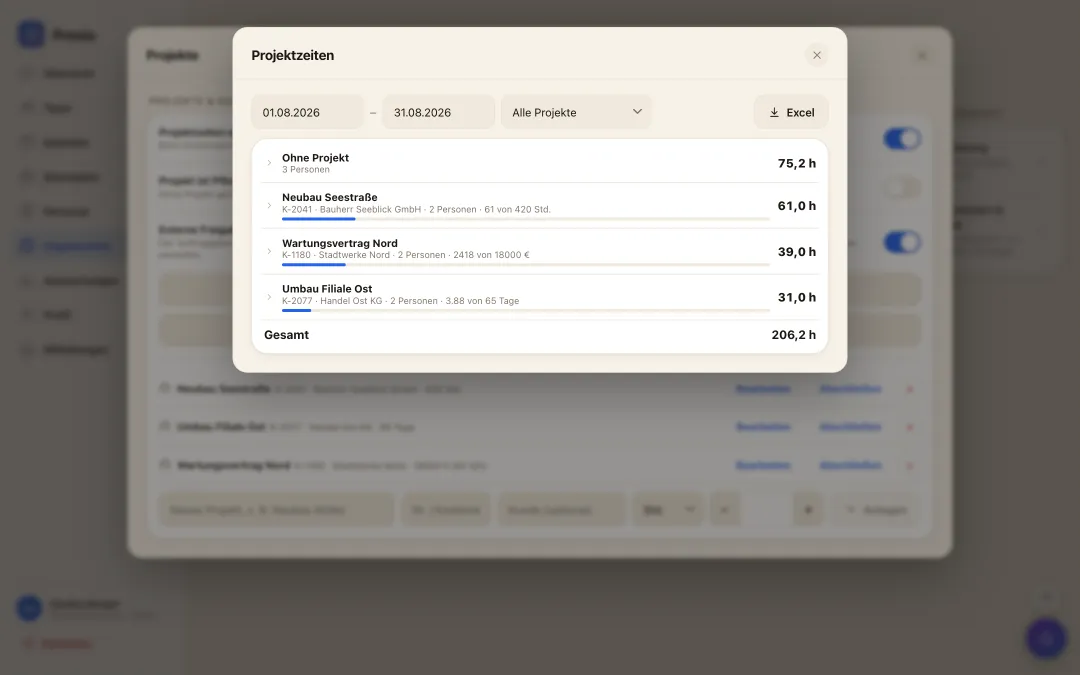
Auswertung der Projektzeiten: Stunden je Projekt und Person mit Budget-Balken und Excel-Export
Project time tracking

Where the hours went - without guessing at month end

  • Picked when clocking in: Tap the project or cost centre when clocking in, switch it mid-shift, assign it afterwards - no second app, no paper slip.
  • Budget in view: Store budgets in hours, days, euros or FTE; the bar always shows how much has been used.
  • Ready for invoicing and costing: Hours per project and person, expandable down to the individual, exported to Excel.
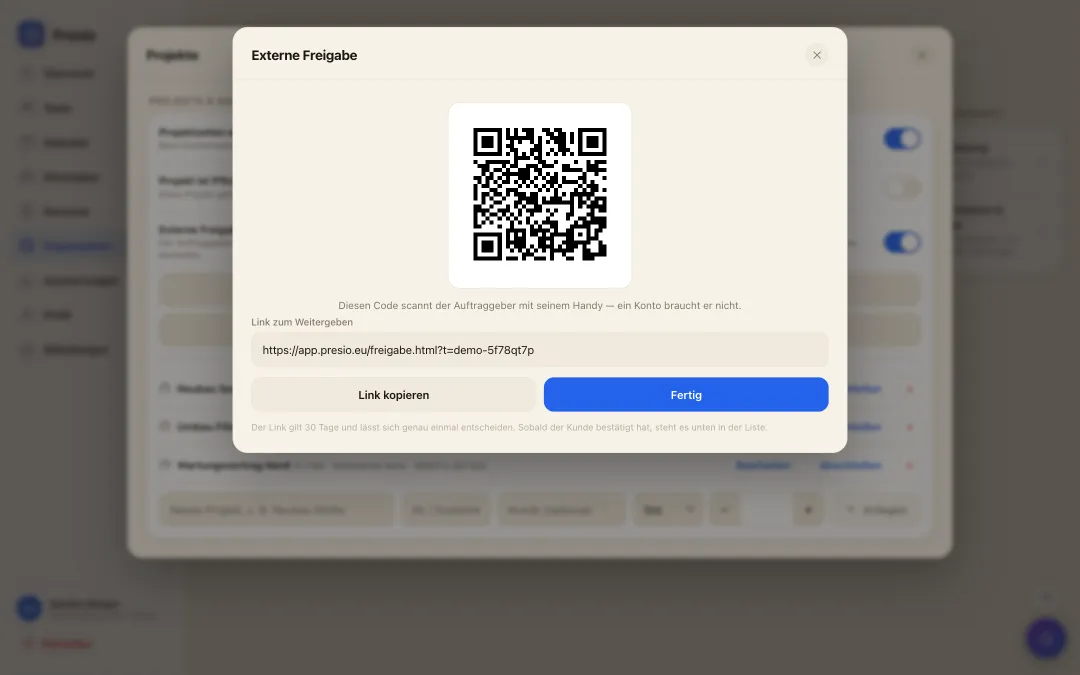
External approval of hours

The customer confirms the hours right there on site

  • A QR code instead of a timesheet: You compile the recorded hours for an assignment and show the code. The customer scans it - no account, no app, straight from their phone.
  • They see what they are confirming: Person, day, hours, and if you want the euro amount per employee and job. Approve or reject with a name and a note - recorded with the time.
  • The invoice at month end: The same hours become the monthly statement with an invoice total that goes straight to the customer. No retyping, no discussion about hours.
Externe Freigabe der Stunden: QR-Code, den der Kunde vor Ort scannt, samt Stundenaufstellung und Beträgen
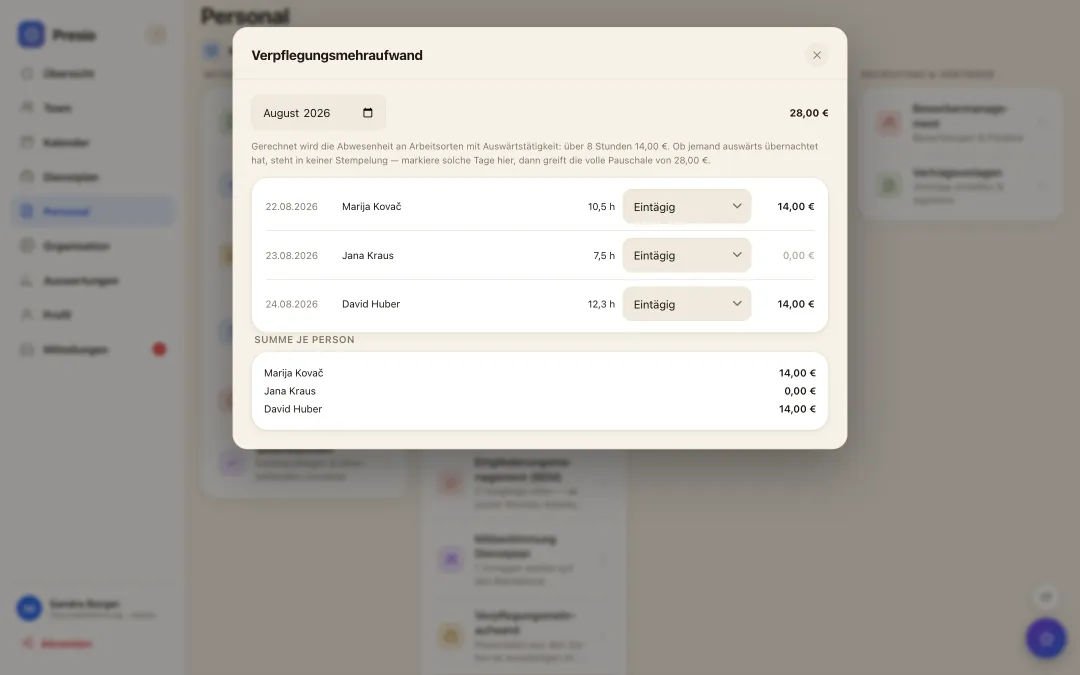
Monatsübersicht der Verpflegungspauschalen je Tag und Person mit Summen
Meal allowance

The allowance works itself out

  • Derived from the recorded times: Work locations are marked as away; the time spent there yields the statutory allowance - over eight hours, per day and person.
  • Absence, not working time: Counted from the first clock-in to the last clock-out. Whoever leaves in the morning and returns in the evening gets the allowance even with a long break in between.
  • Honest about its limits: Whether someone stayed overnight is beyond any punch record. Mark such days in the same row - only then does the full daily rate apply.
Self-scheduling

The team plans along - wishes and availability from the app

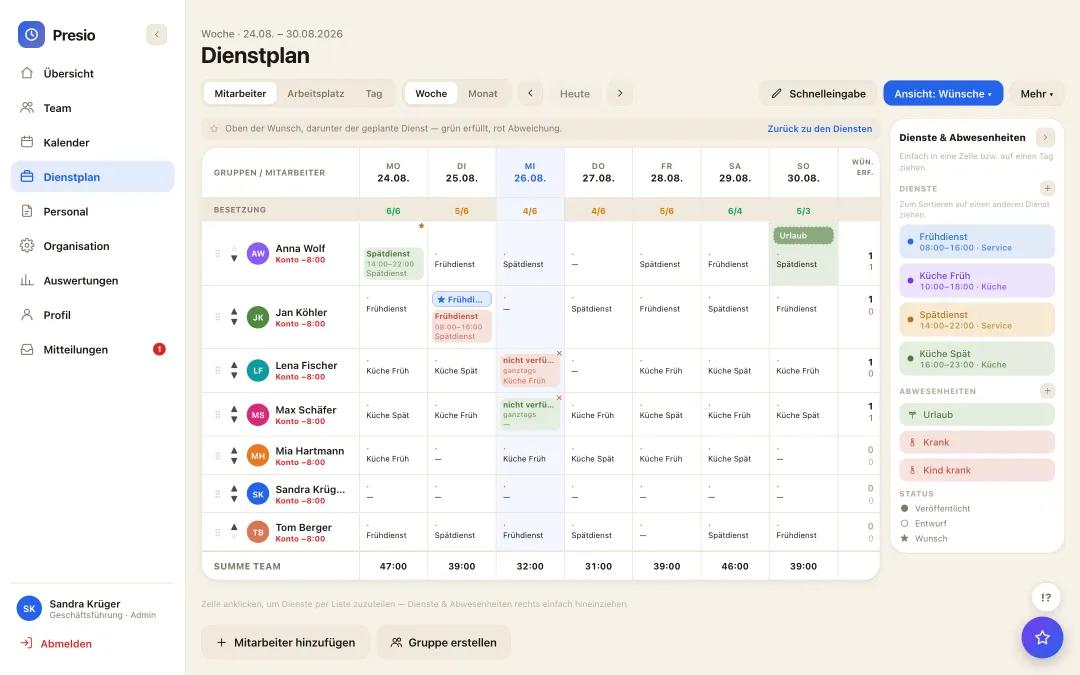
  • Wishes instead of slips of paper: Everyone enters their preferred shifts and availability themselves - on the phone, whenever it suits. No collecting, no retyping, no forgotten request.
  • Visible while planning: The wishes sit right in the plan: green where they are met, red where the plan deviates. Whoever plans sees at once where it pinches.
  • Fair and traceable: Who wished for what and when is recorded - still traceable weeks later if questions come up.
Wunschsicht im Dienstplan: Wünsche und Verfügbarkeiten der Mitarbeitenden neben dem geplanten Dienst
KI-Assistent im Dienstplan schlägt einen vollständigen Wochenplan als Entwurf vor
Roster at the push of a button

The week's roster as a draft - from staffing, qualifications and wishes

  • One click, one draft: The AI builds the weekly roster from staffing requirements, qualifications, working-time rules and the team's wishes - and presents it as a draft, not a decision.
  • The planner decides: Every suggestion can be moved, replaced or discarded. Nothing is published until the planner is satisfied.
  • Rules are respected: Rest periods, maximum working time, qualification per workplace: whatever breaks a rule never makes it into the suggestion.
Shift swap

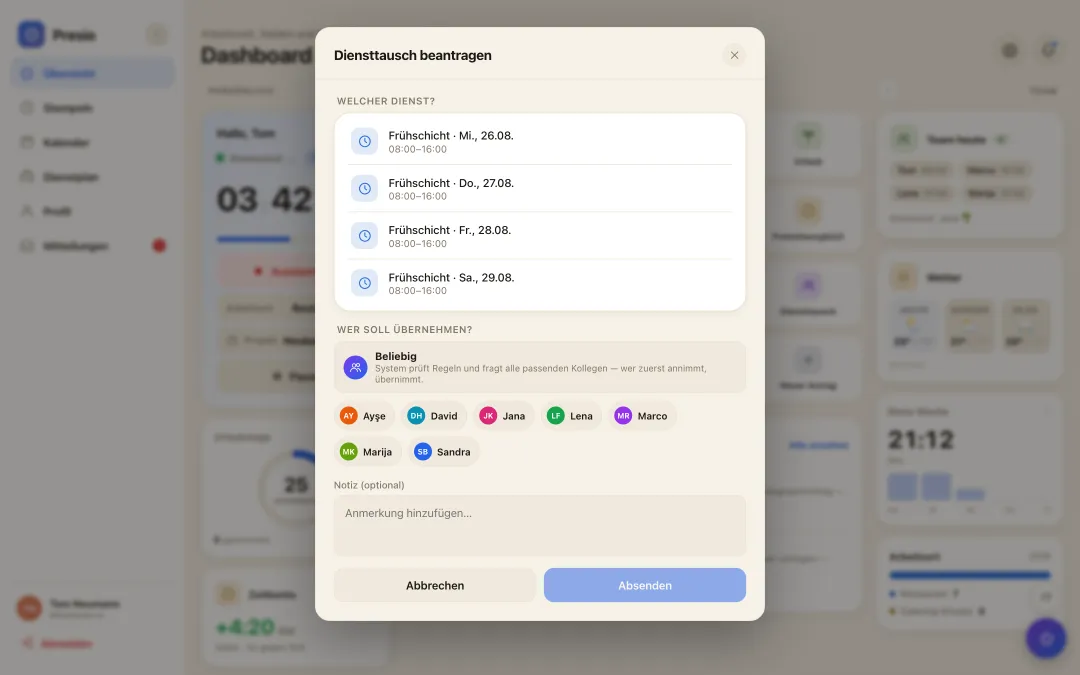
Swap shifts - checked, not on a shout

  • Request in the app: Anyone wanting to give a shift away asks the colleague directly - the answer arrives on the phone, not in the WhatsApp group.
  • Checked automatically: Presio checks every swap against rest periods, maximum working time and the qualification required for the workplace. What doesn't fit is never offered.
  • With or without approval: Configurable per company: the swap takes effect as soon as both agree - or only once the manager has approved it.
Diensttausch in der App: eigener Dienst wählen, Kollegin oder alle passenden anfragen - das System prüft die Regeln
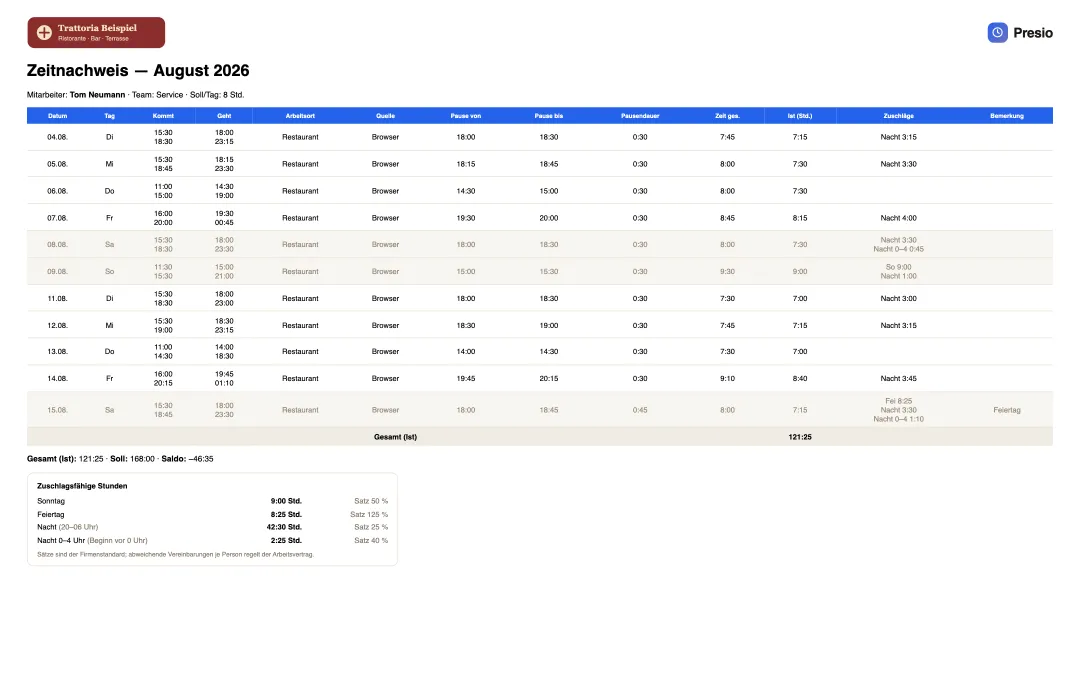
Zeitnachweis eines Mitarbeiters mit Firmenlogo, allen Buchungen des Monats und den zuschlagsfähigen Stunden
Transparency for employees

Everyone sees what goes into their pay - the timesheet with surcharges

  • Everything on one sheet: Every booking with time, location and break, plus total, target and balance - month by month, as PDF or Excel, with the company's logo.
  • Surcharges visible: Sunday, holiday, late and night appear on the timesheet with hours and rate - the same calculation the payroll export delivers to the accountant.
  • Trust instead of questions: Whoever can check their own hours and surcharges does not need to recalculate or ask. Our goal: transparency that creates satisfaction.
Why Presio is a good fit here

Made for your everyday work

  • Clock in per site or beat: Work locations per site - the report shows hours per site for costing and billing, whether it's cleaning or security.
  • 24/7 without gaps: The staffing row shows every shift: no site goes unstaffed, no double booking goes unnoticed.
  • Part-time under control: Many small contracts, clean accounts: weekly hours per person, overtime visible at a glance.
  • Rest periods checked: No early shift right after a night shift: working-time compliance flags violations before publishing.
  • Annual vacation planning: Collect requests, keep staffing per site in view, approve with one click.
  • Shift marketplace: Site unstaffed? Offer the shift, push to everyone suitable, subcontractor added via interface.
  • Time tracking obligation fulfilled: Cleaning and security services fall under §2a SchwarzArbG - Presio keeps audit-proof records.
  • Project times per site: Sites as cost centers: choose when clocking in, also at the kiosk - hours per site and person with budget bar and Excel export.

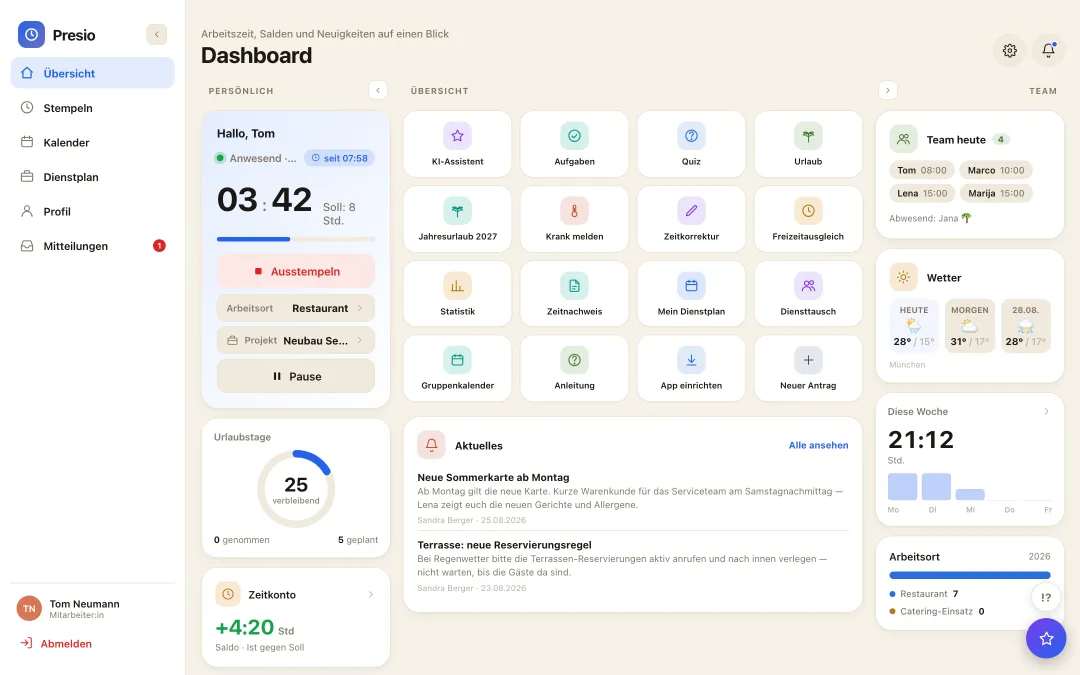
All features at a glance

Presio-Dashboard mit Stempeluhr, Zeitkonto und Schnellzugriffen
Frequently asked questions

Quick answers

Can site managers only see their own sites?

Yes - via groups and roles, every manager sees exactly their own area, whether it's a cleaning site or a security beat.

How does Presio handle floaters?

Floating staff belong to multiple groups and get scheduled wherever they're needed - conflict checking included.

Does Presio support 12-hour shifts?

Yes - long duties, including a warning if statutory maximum limits would be exceeded.

Can clients receive documentation?

The time sheet for each period comes as a PDF - ready to sign.

The first time clock is running within ten minutes

Sign up, create your team, get started - try Presio free and with no obligation, no credit card needed.

Start your free trial