Features Recruiting & Contracts Shift planning Time tracking Absences & vacation HR & Payroll AI & communication Industries HospitalityHotel industryEvents & cateringRetailCar repair shops & dealershipsMedical practices & MVZPharmaciesClinics & care homesHome Care & Ambulance ServicesDay-care & social servicesConstruction & TradesManufacturing & logisticsFacility & Security ServicesMunicipalities & public utilitiesOffice & administration
More
Pricing Guides Careers Log in / Try it free
Language
DeutschEnglishFrançaisEspañolItalianoNederlandsPolskiPortuguêsČeštinaDanskSvenskaSuomiΕλληνικάMagyarRomânăБългарскиHrvatskiSlovenčinaSlovenščinaEestiLietuviųLatviešuMaltiGaeilge
Presio / Car repair shops & dealerships
Sector · Car repair shops & dealerships

Time tracking
for workshop & dealership

Productive hours, service reception, shift work: Presio records the times in workshop and sales, books them onto the job and lets the customer confirm the hours.

Try it free See the live demo No credit card · cancellable monthly · no setup fee
Sound familiar?

Everyday life without a system

Time sheets on the job

Notes get lost, times are entered later from memory.

Productivity unclear

How many hours really hung on the vehicle and how many were spent waiting, nobody knows exactly.

Arguments over the invoice

The customer disputes the hours invoiced - and there is nothing to prove otherwise.

Presio turns every one of these points into a single step. Here's what that looks like:

Kiosk mode

One tablet at the entrance - the whole team clocks in

No smartphone of your own needed: tap, PIN, done - and today's shift shows up right on the screen. Try it out:

Brenner Motors · Kiosk
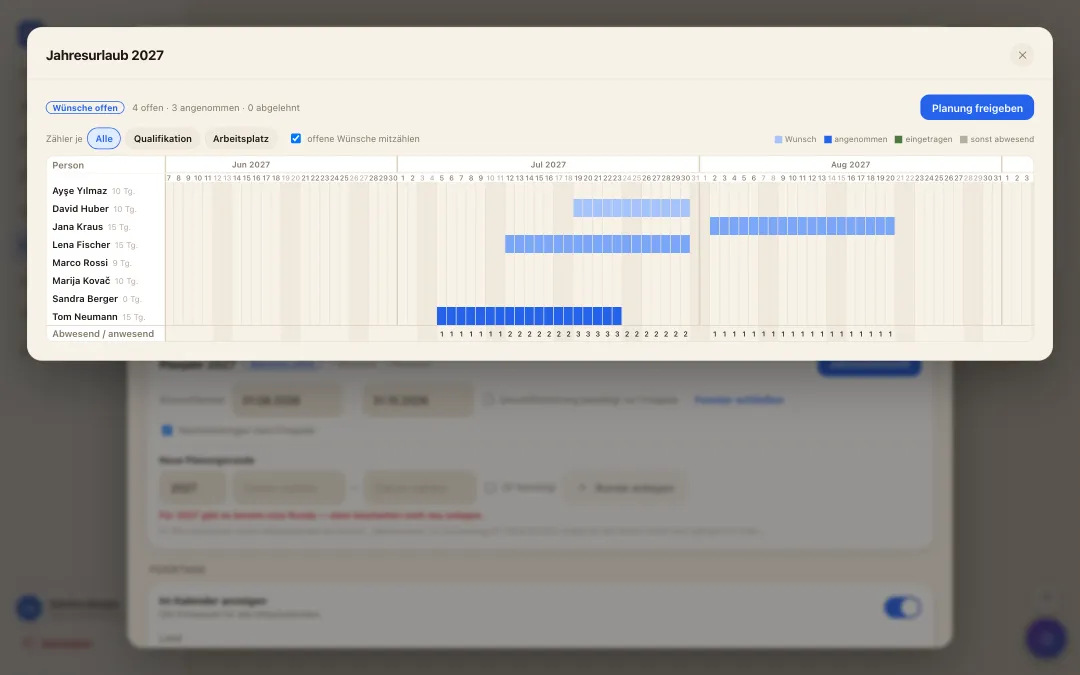
Jahresübersicht der Urlaubsplanung: alle Mitarbeitenden über das ganze Jahr, Wünsche als Balken und Zähler je Tag
annual vacation planning

A whole year of vacation - settled in one morning

  • Collect wishes instead of notes: While the wish window is open, everyone submits their periods for next year - with a priority and a reason, straight from the app.
  • Bottlenecks visible at once: The year overview shows for every day how many are missing and how many are in - optionally per qualification or workplace. Where it gets too tight, it turns red.
  • Release it, done: You drag periods with the mouse and release with a click - they become real approved vacation in the calendar. Late entries stay possible.
Project time tracking

Where the hours went - without guessing at month end

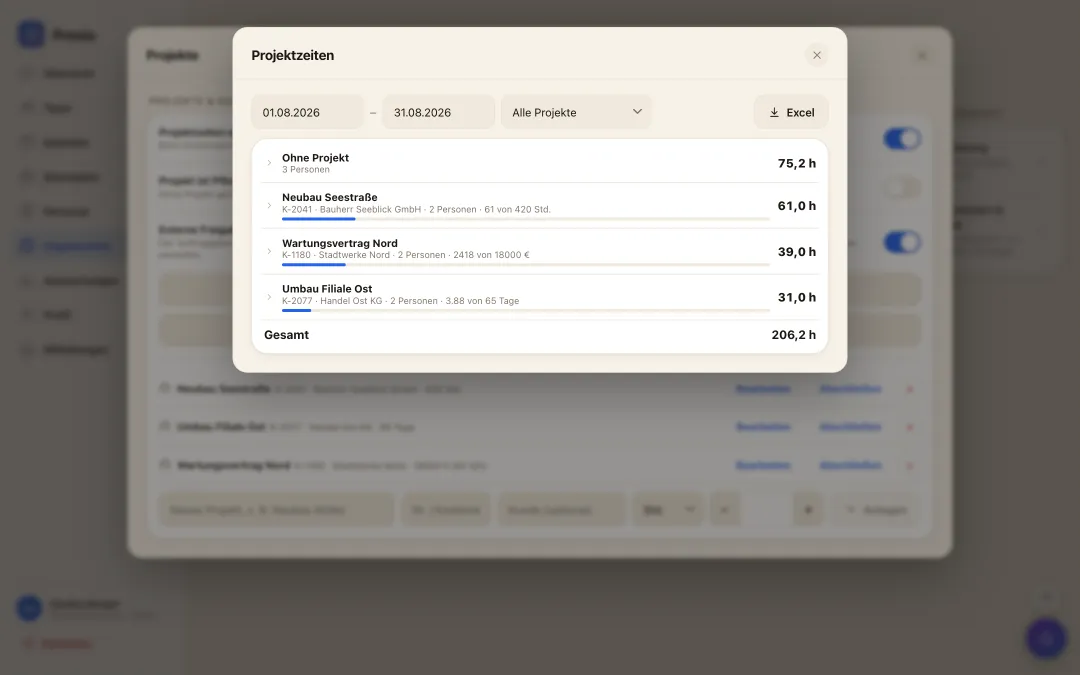
  • Picked when clocking in: Tap the project or cost centre when clocking in, switch it mid-shift, assign it afterwards - no second app, no paper slip.
  • Budget in view: Store budgets in hours, days, euros or FTE; the bar always shows how much has been used.
  • Ready for invoicing and costing: Hours per project and person, expandable down to the individual, exported to Excel.
Auswertung der Projektzeiten: Stunden je Projekt und Person mit Budget-Balken und Excel-Export
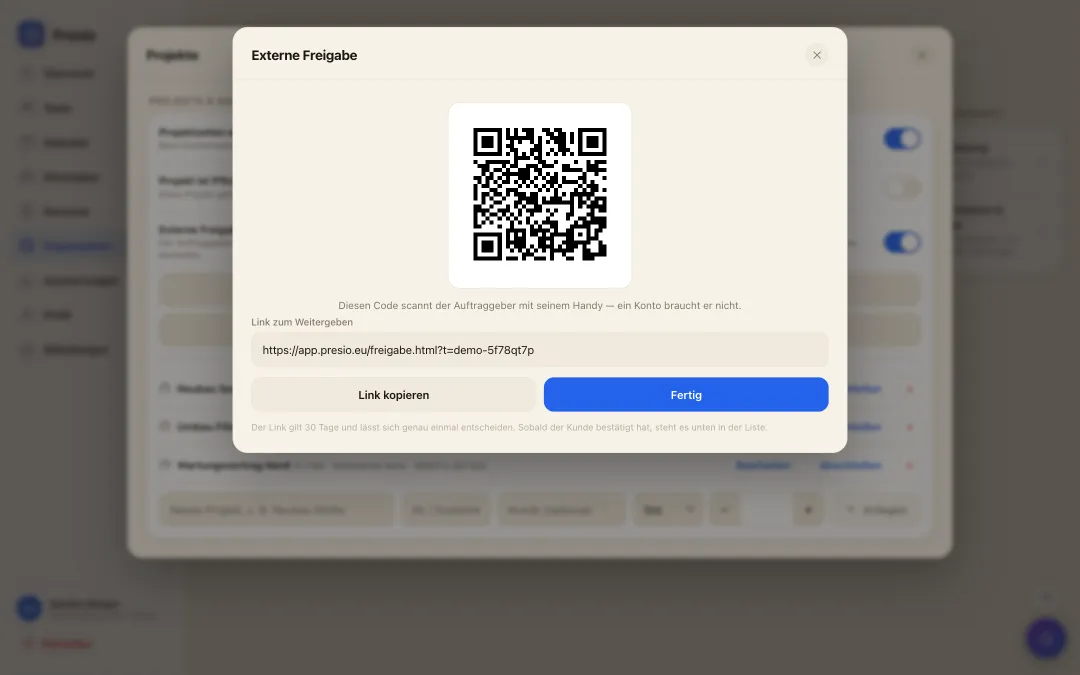
Externe Freigabe der Stunden: QR-Code, den der Kunde vor Ort scannt, samt Stundenaufstellung und Beträgen
External approval of hours

The customer confirms the hours right there on site

  • A QR code instead of a timesheet: You compile the recorded hours for an assignment and show the code. The customer scans it - no account, no app, straight from their phone.
  • They see what they are confirming: Person, day, hours, and if you want the euro amount per employee and job. Approve or reject with a name and a note - recorded with the time.
  • The invoice at month end: The same hours become the monthly statement with an invoice total that goes straight to the customer. No retyping, no discussion about hours.
Why Presio is a good fit here

Made for your everyday work

  • Clocked onto the job: Pick the job or cost centre when clocking in and switch during the day - at month end you know where the hours went.
  • Productive and non-productive kept apart: Set-up, waiting and cleaning time run on their own items so the workshop's utilisation does not look better than it is.
  • The customer confirms the hours: For larger jobs, show the QR code: the customer sees person, day and hours and signs off on their phone - no account needed.
  • Workshop and sales in one plan: Service reception, mechanics, paint shop and sales as separate areas - planned separately, evaluated together.
  • Saturday duty and emergency service: Alternating Saturdays and standby as their own shifts with surcharge logic, including public holidays per state.
  • Clocking in on the tablet in the workshop: A tablet at the workshop entrance, PIN and done - no private phone needed with oily hands.

All features at a glance

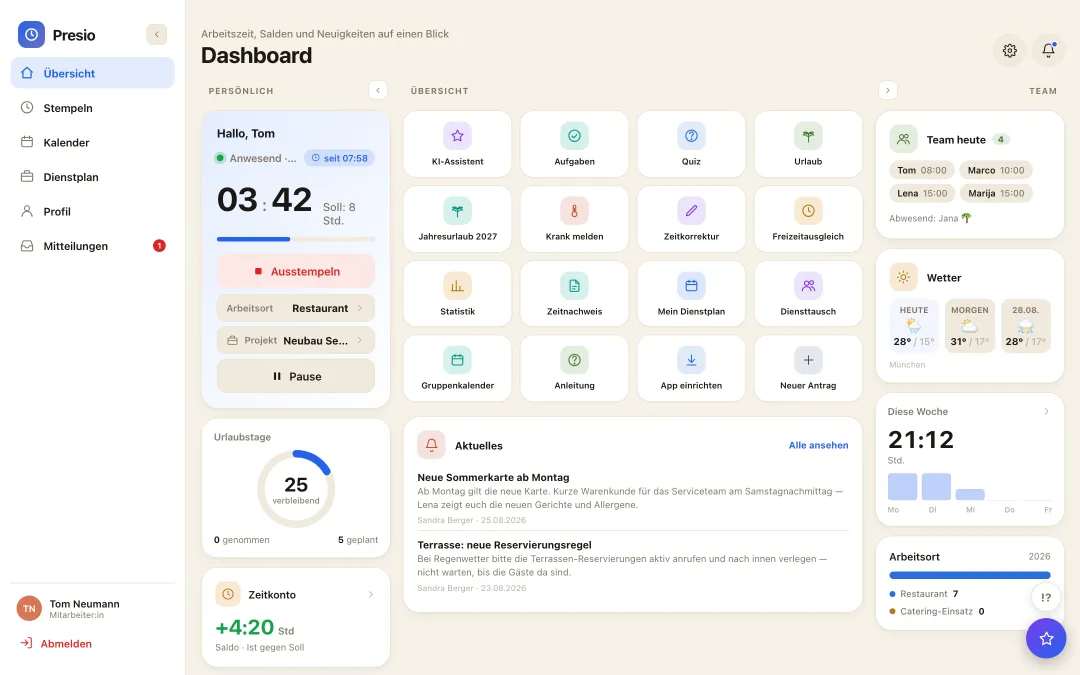
Presio-Dashboard mit Stempeluhr, Zeitkonto und Schnellzugriffen
Frequently asked questions

Quick answers

Does Presio replace our dealer management system?

No - Presio records working time and attendance and books hours onto jobs or cost centres. Job creation, parts and invoicing stay in the DMS. The hours report exports to Excel.

How do we get productive hours per mechanic?

Through the project time report: hours per job and person, expandable down to the single day, with a budget bar per job and Excel export.

The first time clock is running within ten minutes

Sign up, create your team, get started - try Presio free and with no obligation, no credit card needed.

Start your free trial