Features Recruiting & Contracts Shift planning Time tracking Absences & vacation HR & Payroll AI & communication Industries HospitalityHotel industryEvents & cateringRetailCar repair shops & dealershipsMedical practices & MVZPharmaciesClinics & care homesHome Care & Ambulance ServicesDay-care & social servicesConstruction & TradesManufacturing & logisticsFacility & Security ServicesMunicipalities & public utilitiesOffice & administration
More
Pricing Guides Careers Log in / Try it free
Language
DeutschEnglishFrançaisEspañolItalianoNederlandsPolskiPortuguêsČeštinaDanskSvenskaSuomiΕλληνικάMagyarRomânăБългарскиHrvatskiSlovenčinaSlovenščinaEestiLietuviųLatviešuMaltiGaeilge
Presio / Home Care & Ambulance Services
Industry · Home Care & Ambulance Services

Time tracking
for home care & ambulance services

Rounds, calls, changing vehicles: the team clocks in on the go via phone or in the vehicle, management sees hours, qualifications and absences - and payroll export is accurate.

Try it free See the live demo No credit card · cancellable monthly · no setup fee
Sound familiar?

Everyday life without a system

Timesheets in the car or ambulance

Handwritten between two rounds or calls - illegible and incomplete.

On-call by word of mouth

Who's on call today is written on a notice board - or exists only in the dispatcher's head.

Records for the provider

Audit announced - and the great scramble to gather everything begins.

Sick call, phone chain

At 6 a.m. a driver is missing - and the manager phones through half the list until someone says yes.

Presio turns every one of these points into a single step. Here's what that looks like:

Clock in on the go

Clock in where the work happens - with geofencing

  • Location detected: Via geofence, the app knows which round, car or ambulance a clock-in happens on - the work location sets itself.
  • Even offline: No signal on the road in the car or ambulance? Clock-ins are saved and synced later.
  • Evaluable by location: The hours land in the report already assigned to the correct work location.

Tip: the clock-in button on the phone on the right actually works.

9:41
Hi, TomToday
Not clocked in
00:00Target: 8 hrs
Tour Schwabing - recognized as a work location via geofence
Quick actions
Vacation
Sick
Work location
Correction
Overtime
Overview
Records
Request
Overview
Clock
Calendar
Profile
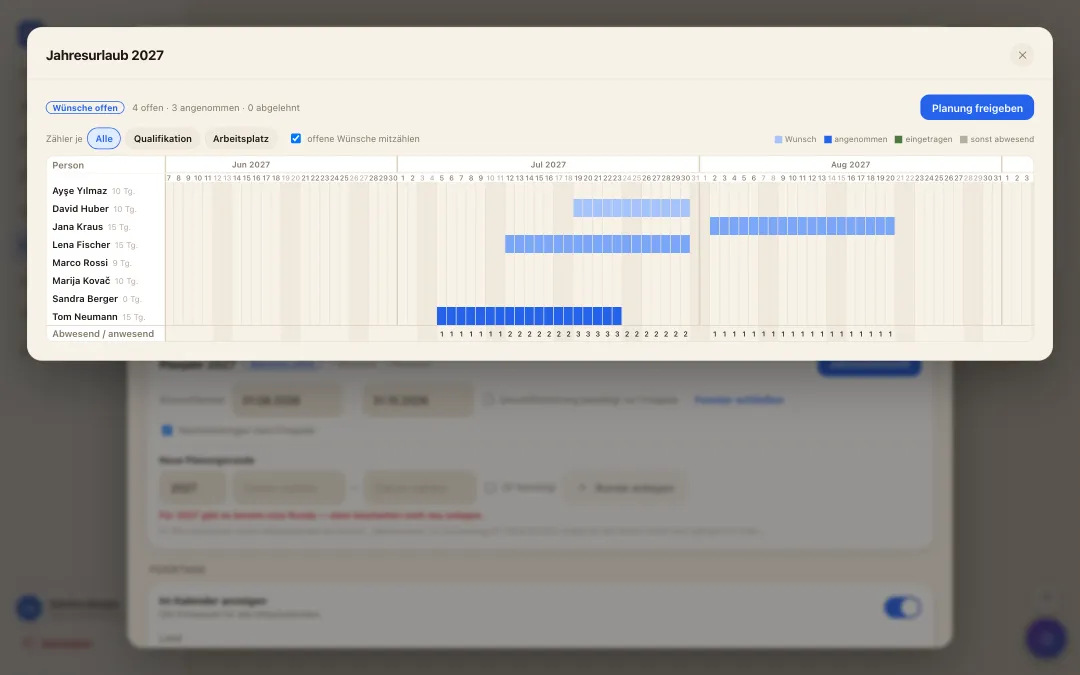
Jahresübersicht der Urlaubsplanung: alle Mitarbeitenden über das ganze Jahr, Wünsche als Balken und Zähler je Tag
annual vacation planning

A whole year of vacation - settled in one morning

  • Collect wishes instead of notes: While the wish window is open, everyone submits their periods for next year - with a priority and a reason, straight from the app.
  • Bottlenecks visible at once: The year overview shows for every day how many are missing and how many are in - optionally per qualification or workplace. Where it gets too tight, it turns red.
  • Release it, done: You drag periods with the mouse and release with a click - they become real approved vacation in the calendar. Late entries stay possible.
Shift offers & agency staff

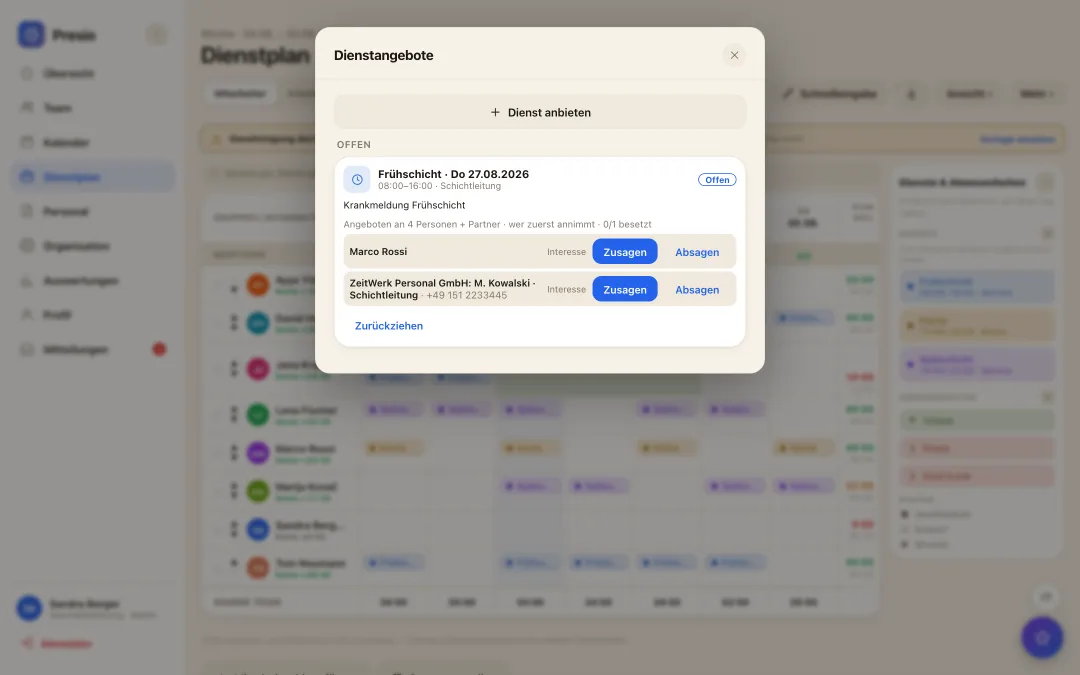
Sick call at six - cover by half past

  • One click out of the gap: The red cell in the plan offers the shift to exactly the right people - filtered by qualification, pushed to their phone.
  • First to accept is scheduled: Or you collect who is interested and decide yourself. The shift then lands in the plan on its own.
  • Agency staff asked at the same time: Staffing agencies get the same offer through their own interface and report back their people - who count towards the required staffing, with no chain of phone calls.
Dienstangebot nach einer Krankmeldung: Angebot an passende Mitarbeitende und an eine Personaldienstleisterin, Zusagen im Vergleich
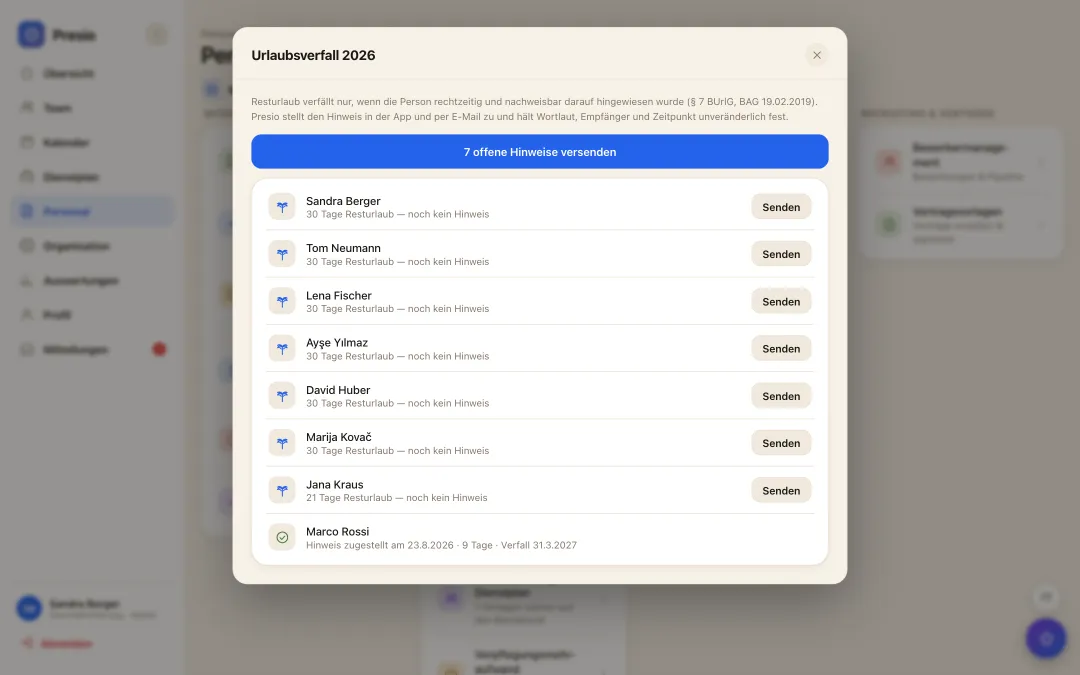
Liste aller Mitarbeitenden mit offenem Resturlaub und dem Stand der zugestellten Hinweise
Expiring leave

The notice without which nothing expires

  • No notice, no expiry: Since the European and Federal Labour Court rulings, remaining leave only expires if the employer gave a timely, individual and provable notice. Otherwise it adds up over the years - and is paid out on departure.
  • One click instead of a mail merge: Presio knows every balance, shows everyone with days left and delivers the notice: in the app and by email, with the exact number and the exact expiry date.
  • Evidence that stays: Wording, recipient, channel and time are recorded immutably. Evidence you can change afterwards is not evidence in court.
Integration management

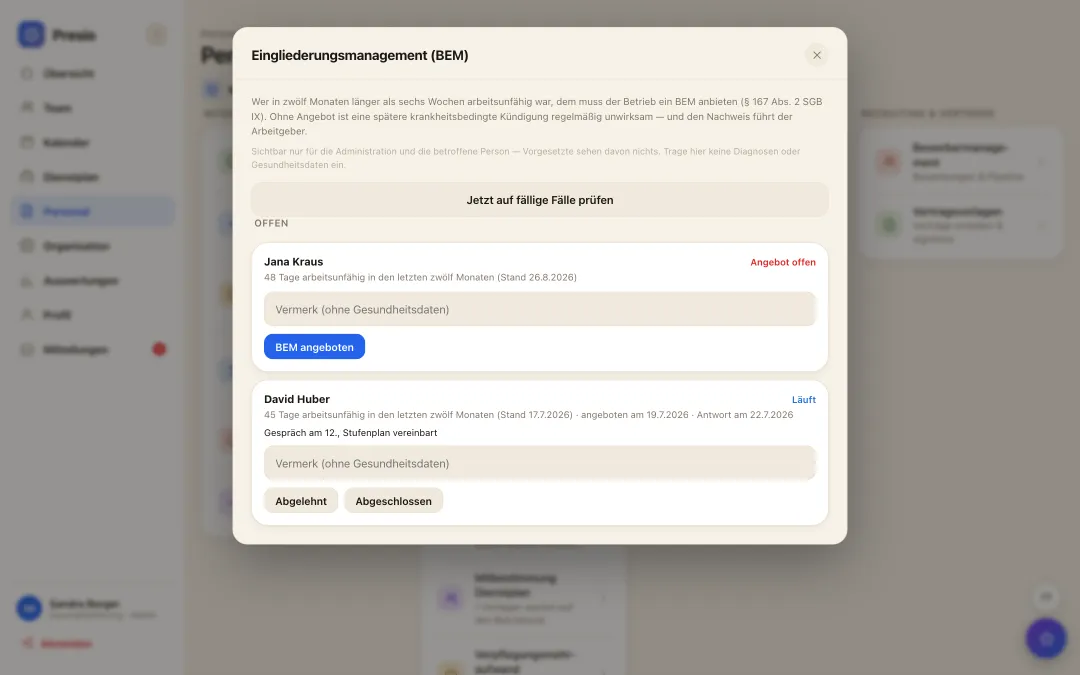
Six weeks off sick - what now?

  • The threshold is detected: More than six weeks unfit for work within twelve months, in one stretch or added up from several periods: Presio counts without double-counting days and creates the case (§ 167 SGB IX).
  • The case is tracked: Offered, accepted, completed or declined - each with a timestamp. Without a documented offer, a later dismissal on health grounds usually fails.
  • Strictly separated: Health data is none of a manager's business: the area is visible only to administration and the person concerned, enforced right down to the database.
Übersicht der BEM-Vorgänge mit Arbeitsunfähigkeitstagen und Bearbeitungsstand
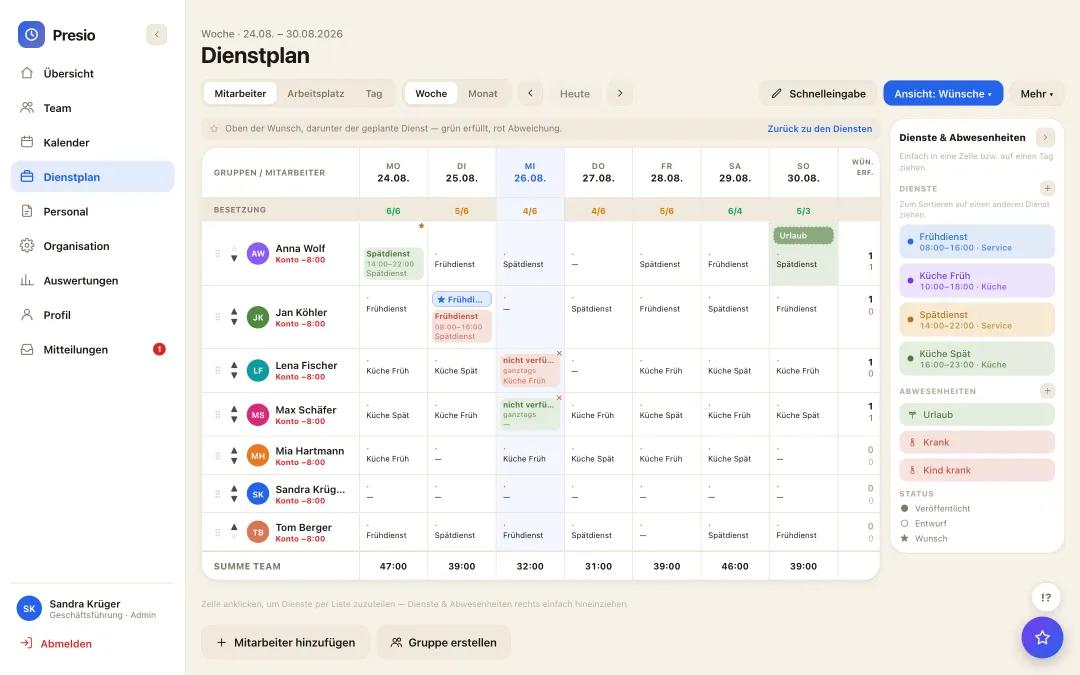
Wunschsicht im Dienstplan: Wünsche und Verfügbarkeiten der Mitarbeitenden neben dem geplanten Dienst
Self-scheduling

The team plans along - wishes and availability from the app

  • Wishes instead of slips of paper: Everyone enters their preferred shifts and availability themselves - on the phone, whenever it suits. No collecting, no retyping, no forgotten request.
  • Visible while planning: The wishes sit right in the plan: green where they are met, red where the plan deviates. Whoever plans sees at once where it pinches.
  • Fair and traceable: Who wished for what and when is recorded - still traceable weeks later if questions come up.
Roster at the push of a button

The week's roster as a draft - from staffing, qualifications and wishes

  • One click, one draft: The AI builds the weekly roster from staffing requirements, qualifications, working-time rules and the team's wishes - and presents it as a draft, not a decision.
  • The planner decides: Every suggestion can be moved, replaced or discarded. Nothing is published until the planner is satisfied.
  • Rules are respected: Rest periods, maximum working time, qualification per workplace: whatever breaks a rule never makes it into the suggestion.
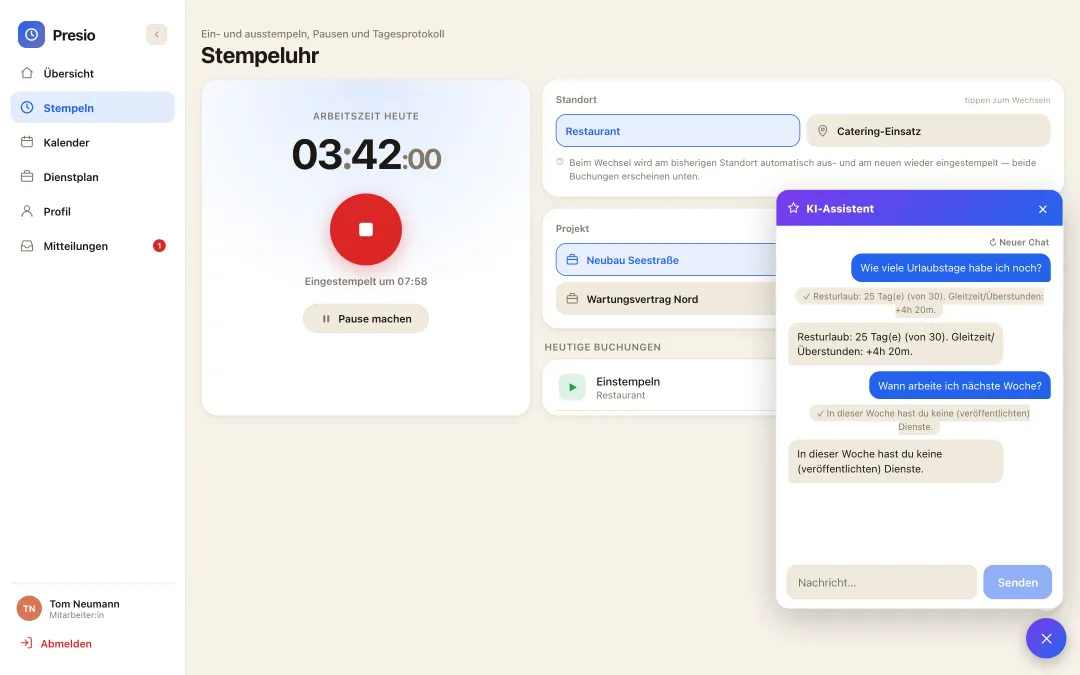
KI-Assistent im Dienstplan schlägt einen vollständigen Wochenplan als Entwurf vor
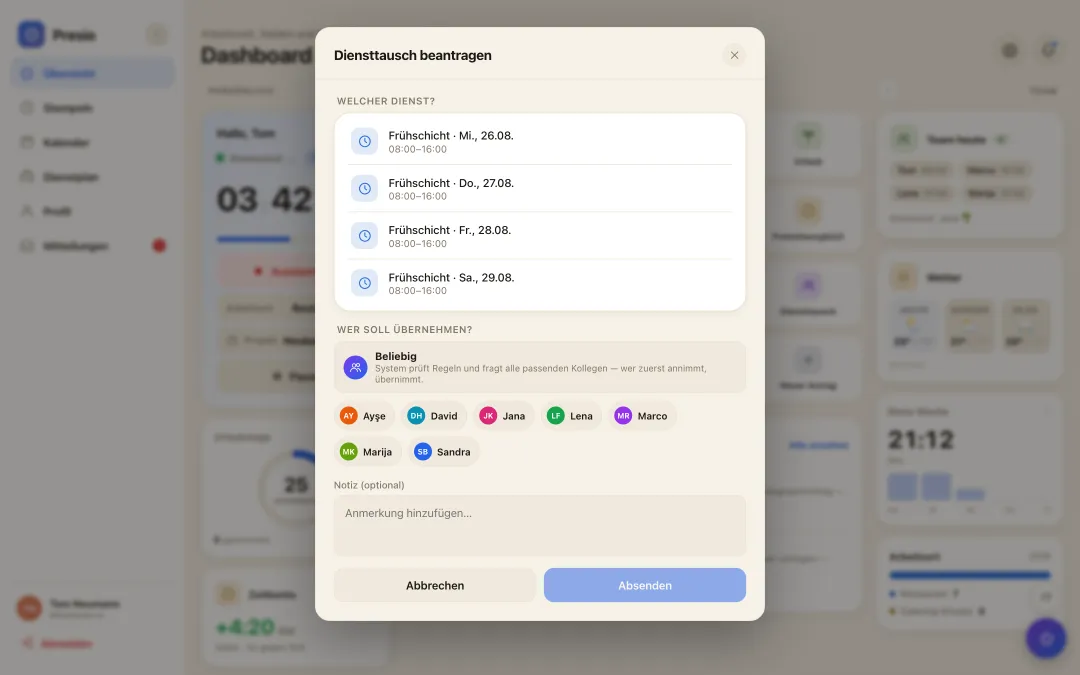
Diensttausch in der App: eigener Dienst wählen, Kollegin oder alle passenden anfragen - das System prüft die Regeln
Shift swap

Swap shifts - checked, not on a shout

  • Request in the app: Anyone wanting to give a shift away asks the colleague directly - the answer arrives on the phone, not in the WhatsApp group.
  • Checked automatically: Presio checks every swap against rest periods, maximum working time and the qualification required for the workplace. What doesn't fit is never offered.
  • With or without approval: Configurable per company: the swap takes effect as soon as both agree - or only once the manager has approved it.
Transparency for employees

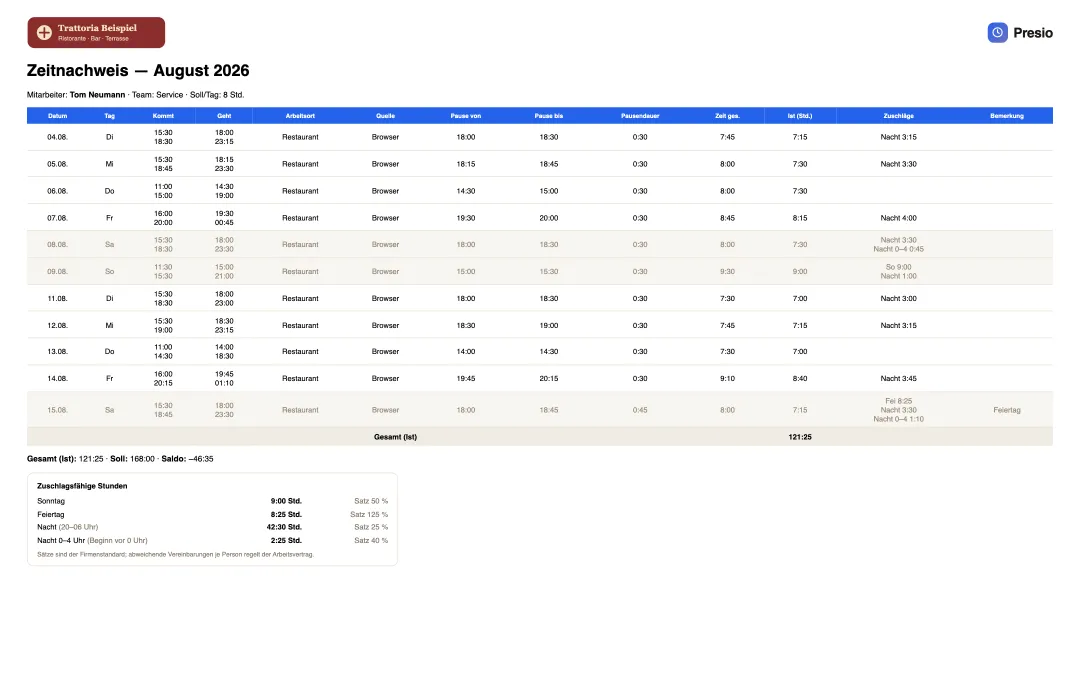
Everyone sees what goes into their pay - the timesheet with surcharges

  • Everything on one sheet: Every booking with time, location and break, plus total, target and balance - month by month, as PDF or Excel, with the company's logo.
  • Surcharges visible: Sunday, holiday, late and night appear on the timesheet with hours and rate - the same calculation the payroll export delivers to the accountant.
  • Trust instead of questions: Whoever can check their own hours and surcharges does not need to recalculate or ask. Our goal: transparency that creates satisfaction.
Zeitnachweis eines Mitarbeiters mit Firmenlogo, allen Buchungen des Monats und den zuschlagsfähigen Stunden
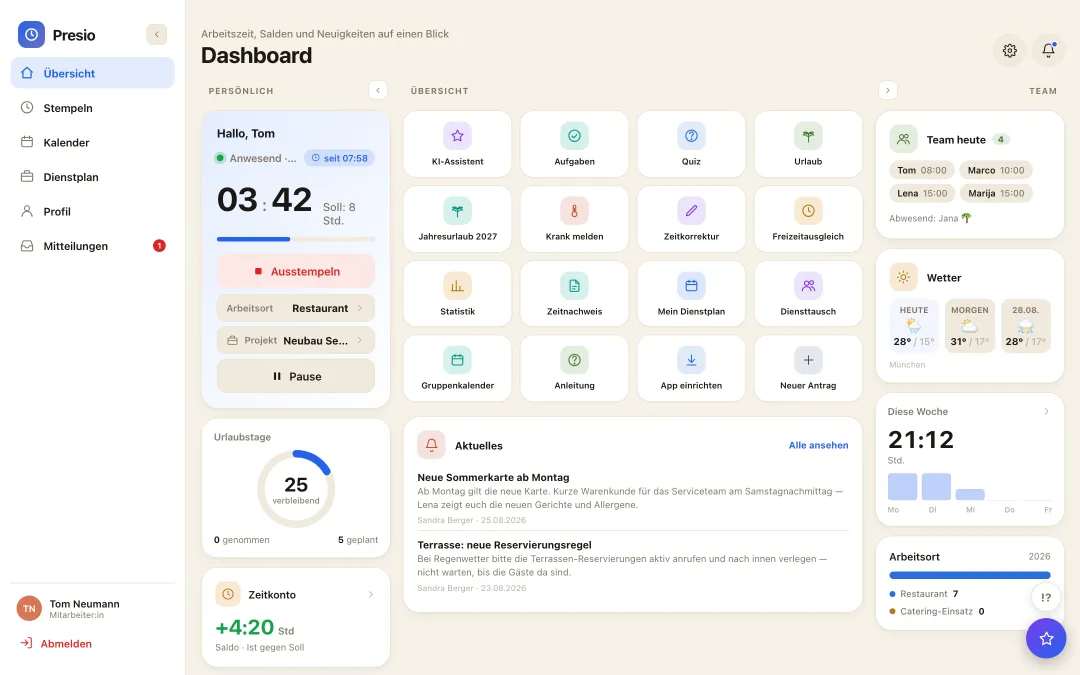
Presio-Dashboard mit Stempeluhr, Zeitkonto und Schnellzugriffen
Why Presio is a good fit here

Made for your everyday work

  • Clocking in on the go: Clock in and out on your smartphone with work location - even offline, syncing happens later.
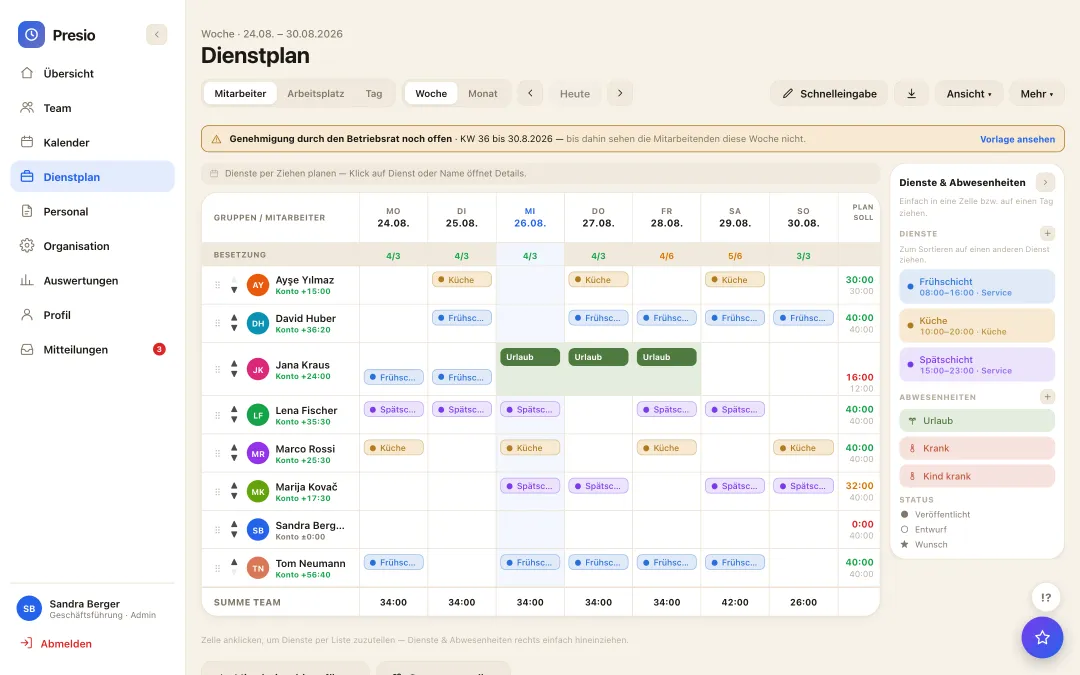
  • Shifts, rounds & calls: Early and late rounds, station duty or emergency shifts as shift types with their own times; the schedule shows who's out and when.
  • Special duty types, freely defined: On-call, standby or emergency duty as its own shift type with its own times and surcharges - just like any other shift.
  • Scheduling by qualification: Paramedic, EMT, driver or qualified nurse: shifts require qualifications - the schedule flags it when they're missing.
  • Annual vacation planning: Collect requests, keep drivers and skilled staff per day in view, approve with one click.
  • Shift marketplace: Route without a driver? Offer the shift, push to everyone suitable, temp staffing added via interface.
  • Multiple schedules: Plan station, school or locations separately, people on one or more schedules - one time tracking, one vacation account.
  • Time sheet per employee: Signature-ready hours record as PDF - for funding bodies, audits and your records.

All features at a glance

Frequently asked questions

Quick answers

Does the app also work without a network connection?

Yes - clock-ins are saved locally and synced automatically once a connection is back - even from the ambulance with no signal.

How do we keep overtime under control?

The working-time account runs automatically alongside; time off in lieu is submitted as a request and offset cleanly.

Can we map on-call or standby duty?

Yes - set it up as its own shift type with its own times and surcharges, just like an early or late shift.

Can scheduling be based on qualifications?

Yes - store qualifications like paramedic or emergency medical technician per person; scheduling flags it when a shift is missing the right qualification.

The first time clock is running within ten minutes

Sign up, create your team, get started - try Presio free and with no obligation, no credit card needed.

Start your free trial