Features Recruiting & Contracts Shift planning Time tracking Absences & vacation HR & Payroll AI & communication Industries HospitalityHotel industryEvents & cateringRetailCar repair shops & dealershipsMedical practices & MVZPharmaciesClinics & care homesHome Care & Ambulance ServicesDay-care & social servicesConstruction & TradesManufacturing & logisticsFacility & Security ServicesMunicipalities & public utilitiesOffice & administration
More
Pricing Guides Careers Book a demo Log in / Try it free
Language
DeutschEnglishFrançaisEspañolItalianoNederlandsPolskiPortuguêsČeštinaDanskSvenskaSuomiΕλληνικάMagyarRomânăБългарскиHrvatskiSlovenčinaSlovenščinaEestiLietuviųLatviešuMaltiGaeilge
Presio / Pharmacies
Industry · Pharmacies

Shift-planning software
for Pharmacies

On-call duties, rotating staff, part-time at the counter: Presio plans the pharmacy's week, tracks working hours and delivers finished figures to your tax advisor.

Try it free See the live demo No credit card · cancellable monthly · no setup fee
Sound familiar?

Everyday life without a system

On-call puzzle

On-call duties assigned via a phone chain - and still double-booked.

Slips of paper next to the register

Punch slips at the pharmacy counter - half of them are missing by month's end.

Public holidays by federal state

Which day counts how? Doing it by hand, mistakes creep in fast.

Presio turns every one of these points into a single step. Here's what that looks like:

Rosen-Apotheke · Kiosk
Kiosk mode

One tablet at the entrance - the whole team clocks in

No smartphone of your own needed: tap, PIN, done - and today's shift shows up right on the screen. Try it out:

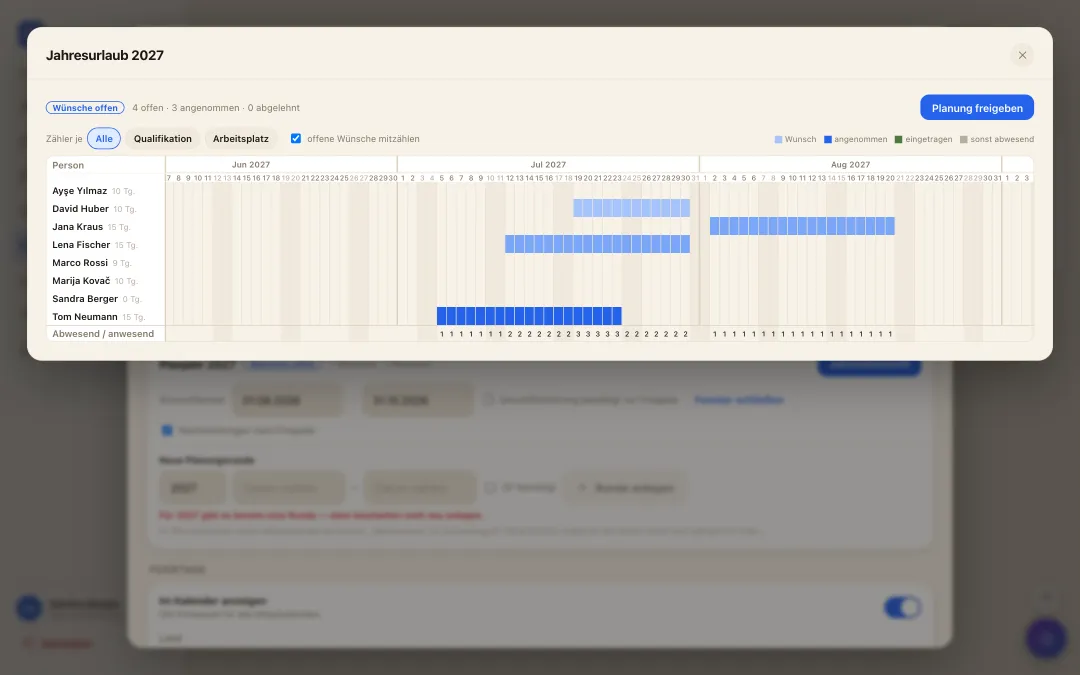
Annual overview of vacation planning: all employees across the whole year, requests as bars and a counter per day
annual vacation planning

A whole year of vacation - settled in one morning

  • ✓Collect wishes instead of notes: While the wish window is open, everyone submits their periods for next year - with a priority and a reason, straight from the app.
  • ✓Bottlenecks visible at once: The year overview shows for every day how many are missing and how many are in - optionally per qualification or workplace. Where it gets too tight, it turns red.
  • ✓Release it, done: You drag periods with the mouse and release with a click - they become real approved vacation in the calendar. Late entries stay possible.
Self-scheduling

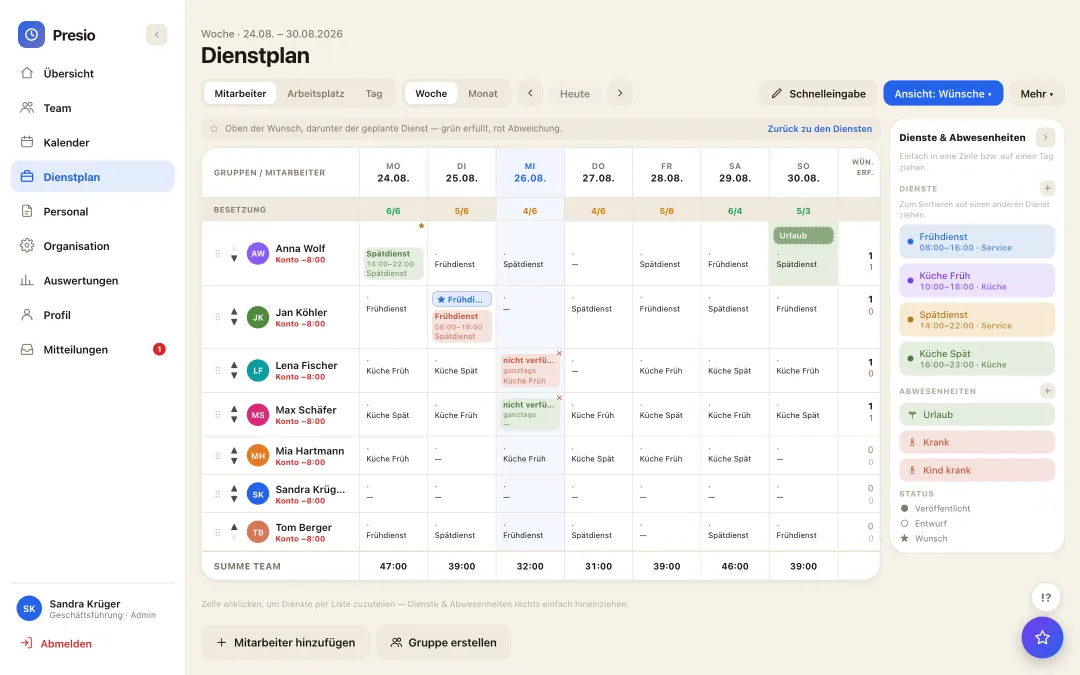
The team plans along - wishes and availability from the app

  • ✓Wishes instead of slips of paper: Everyone enters their preferred shifts and availability themselves - on the phone, whenever it suits. No collecting, no retyping, no forgotten request.
  • ✓Visible while planning: The wishes sit right in the plan: green where they are met, red where the plan deviates. Whoever plans sees at once where it pinches.
  • ✓Fair and traceable: Who wished for what and when is recorded - still traceable weeks later if questions come up.
Wish view in the roster: employees' wishes and availability next to the planned shift
AI assistant in the roster suggests a complete weekly roster as a draft
Roster at the push of a button

The week's roster as a draft - from staffing, qualifications and wishes

  • ✓One click, one draft: The AI builds the weekly roster from staffing requirements, qualifications, working-time rules and the team's wishes - and presents it as a draft, not a decision.
  • ✓The planner decides: Every suggestion can be moved, replaced or discarded. Nothing is published until the planner is satisfied.
  • ✓Rules are respected: Rest periods, maximum working time, qualification per workplace: whatever breaks a rule never makes it into the suggestion.
Shift swap

Swap shifts - checked, not on a shout

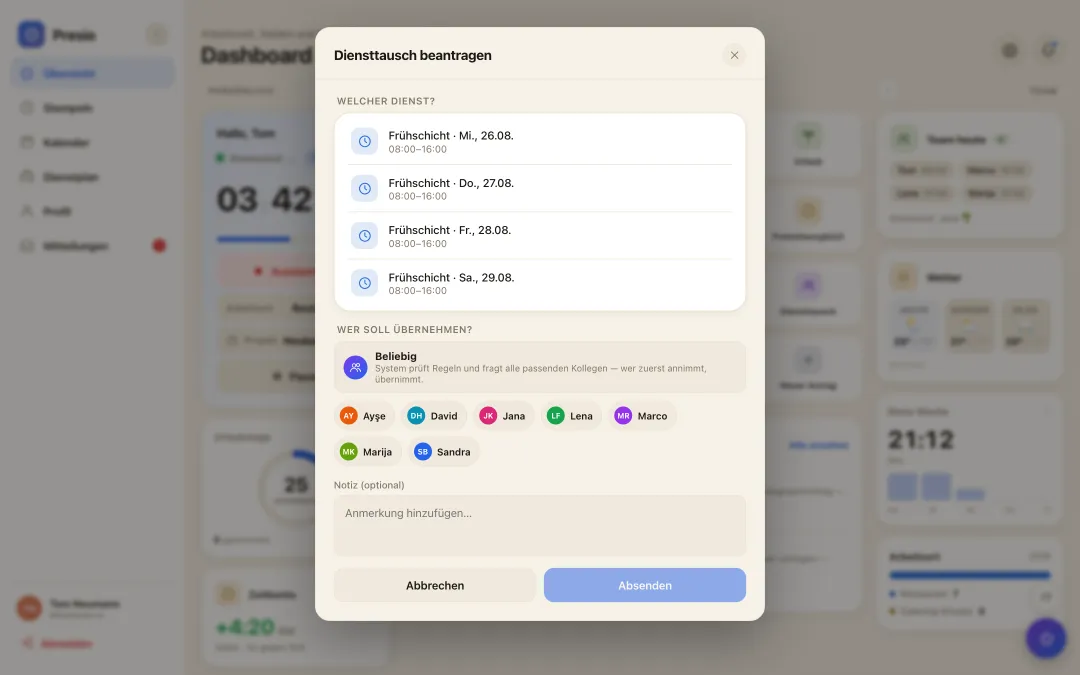
  • ✓Request in the app: Anyone wanting to give a shift away asks the colleague directly - the answer arrives on the phone, not in the WhatsApp group.
  • ✓Checked automatically: Presio checks every swap against rest periods, maximum working time and the qualification required for the workplace. What doesn't fit is never offered.
  • ✓With or without approval: Configurable per company: the swap takes effect as soon as both agree - or only once the manager has approved it.
Shift swap in the app: pick your own shift, ask a colleague or everyone suitable - the system checks the rules
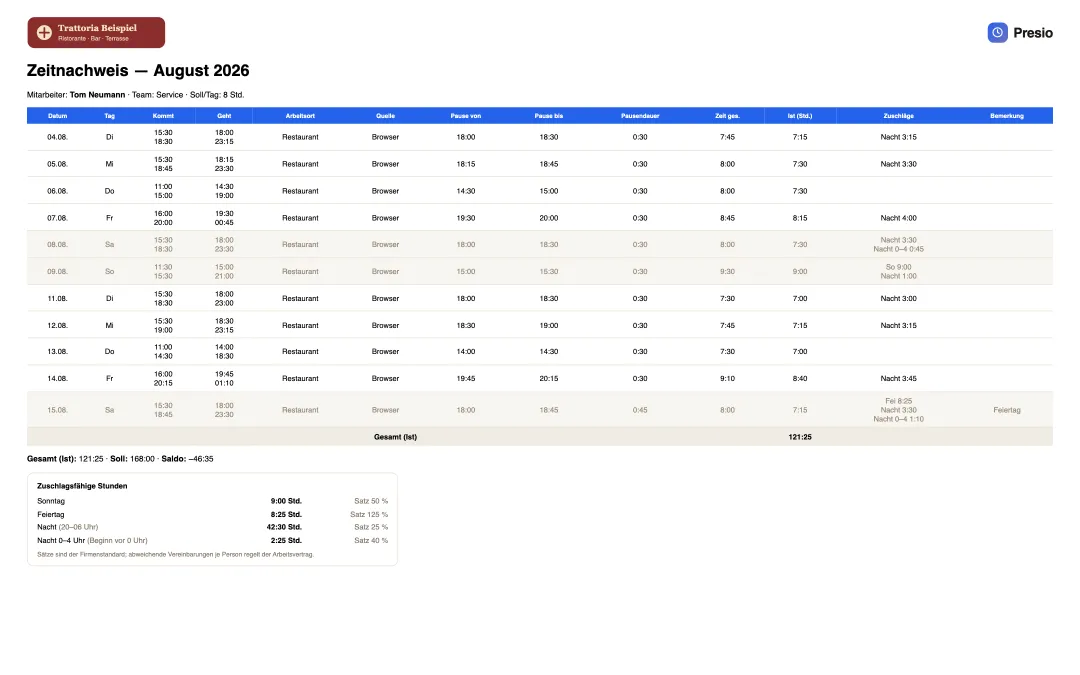
Employee time record with company logo, all entries of the month and the hours eligible for premiums
Transparency for employees

Everyone sees what goes into their pay - the timesheet with surcharges

  • ✓Everything on one sheet: Every booking with time, location and break, plus total, target and balance - month by month, as PDF or Excel, with the company's logo.
  • ✓Surcharges visible: Sunday, holiday, late and night appear on the timesheet with hours and rate - the same calculation the payroll export delivers to the accountant.
  • ✓Trust instead of questions: Whoever can check their own hours and surcharges does not need to recalculate or ask. Our goal: transparency that creates satisfaction.
Why Presio is a good fit here

Made for your everyday work

  • ✓On-call duty in the schedule: On-call duties as their own shift type with premium logic - including public-holiday detection per federal state.
  • ✓Staffing at a glance: The staffing row shows immediately whether the front counter and back office are adequately staffed.
  • ✓Missing clock-ins: Before month-end close, the review list shows open days - fill them in, done, export.
  • ✓Qualifications in staffing: Store pharmacist license, PTA or PKA as a qualification for each person - the conflict check flags it when a shift is missing the required qualification.
  • ✓Lots of part-time, correct target hours: Store employment type, weekly hours and working days for each person - target hours are calculated automatically, including public holidays by federal state.
  • ✓Multiple branches: Each branch as its own schedule with its own shifts - anyone who helps out appears on several schedules and still has only one time account.

All features at a glance

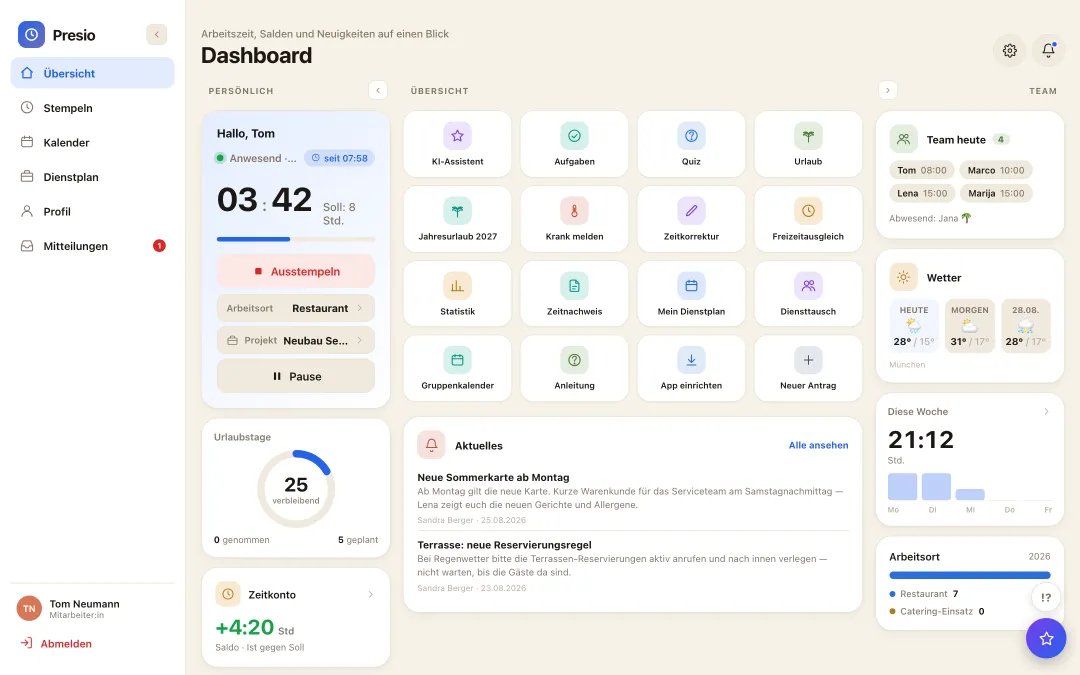
Presio dashboard with time clock, time account and quick access
Expert articles

Workforce management in the pharmacy

Staff scheduling, time tracking, allowances, personnel management and the rules that apply in the pharmacy – what a personnel management software must do and why Presio was built for it.

Read specialist article

In practice: Staff rota for the pharmacy - obligations, typical mistakes and a checklist.

Frequently asked questions

Quick answers

Can we create our own shifts, like on-call duty?

Yes - any duties with times, colours and premiums; Presio comes with sensible templates.

How do the hours get to the tax advisor?

As a DATEV or Lexware export, or alternatively Excel/PDF - including breaks and surcharges.

How is on-call duty past midnight calculated?

To the minute, by clock time: the hours up to midnight count toward the first day, those after toward the second. Night, Sunday and public holiday premiums appear day by day in the time sheet.

Does Presio notice when no licensed pharmacist is scheduled?

Yes, if the pharmacist license is stored as a qualification for the shift: the conflict check flags missing qualifications before the schedule is published.

Can several branches be planned together?

Yes - each branch as its own schedule. Anyone helping out at another branch appears on both schedules; the time account and vacation account remain one.

How do you plan vacation in a pharmacy team?

With annual vacation planning: collect requests for next year with priorities, see in the annual overview by day and qualification when things get tight, and then decide all at once.

The first time clock is running within ten minutes

Sign up, create your team, get started - try Presio free and with no obligation, no credit card needed.

Start your free trial