Features Recruiting & Contracts Shift planning Time tracking Absences & vacation HR & Payroll AI & communication Industries HospitalityHotel industryEvents & cateringRetailCar repair shops & dealershipsMedical practices & MVZPharmaciesClinics & care homesHome Care & Ambulance ServicesDay-care & social servicesConstruction & TradesManufacturing & logisticsFacility & Security ServicesMunicipalities & public utilitiesOffice & administration
More
Pricing Guides Careers Log in / Try it free
Language
DeutschEnglishFrançaisEspañolItalianoNederlandsPolskiPortuguêsČeštinaDanskSvenskaSuomiΕλληνικάMagyarRomânăБългарскиHrvatskiSlovenčinaSlovenščinaEestiLietuviųLatviešuMaltiGaeilge
Presio / Absences & Vacation
Absences & vacation

In three taps
Request vacation.

Vacation, sick leave, special leave, training, time off in lieu: every request follows the same clear path - submit, approve, done. The vacation account keeps track.

Try it free See the live demo No credit card · cancellable monthly · no setup fee
To try out

Vacation next week - tap the days:

Sat05.09. Sun06.09.

Weekends don't count - just like in a real request. Public holidays don't either, by the way.

All features

Every absence follows its own path

Vacation with an accountVacation days per employee, pro-rated on joining and leaving, remaining vacation always visible - including half days.
time off in lieuTake whole days off, and Presio deducts the hours from the time account - no separate request process needed.
Sick & child sickReport sick in seconds, optionally with a note referencing the AU (certificate of incapacity for work) - the schedule is updated instantly.
Special leave with a reasonWedding, birth, moving house: the §616 occasions are ready as a list and go straight into the request note.
Custom absence typesTraining, unpaid leave or something entirely your own - freely definable with color, icon and effect on the account.
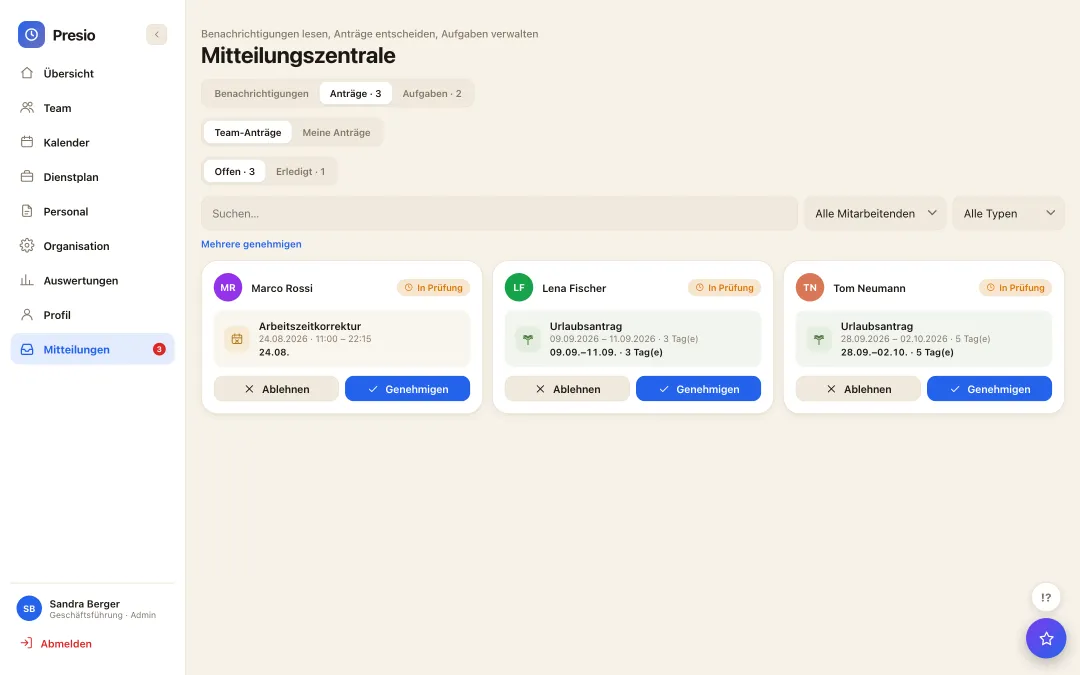
Approval with coverManagers decide in the notification center - when the manager is on vacation, the designated substitute takes over.
Team & Group CalendarWho's away when? The calendar shows all absences at a glance - for employees too.
annual vacation planningRequest window for next year, annual overview with counters per day and qualification, approval with one click - and the approved vacations are done.
Admin listAll recorded absences in one place - editing, deleting and adding retroactively included.
Change & CancelA request isn't set in stone: as long as it hasn't been approved, it can be adjusted or withdrawn - after that, via a counter-request.
Mitteilungszentrale mit offenen Anträgen und Genehmigen-Knöpfen
For managers

Approving is one click - even several at once

  • Everything in one place: open requests in the notification center, sorted and filtered.
  • Context included: Remaining vacation, overlaps with the team, and the schedule right alongside it.
  • Both are notified: Employees see the decision immediately in the app - with a push notification to their phone.
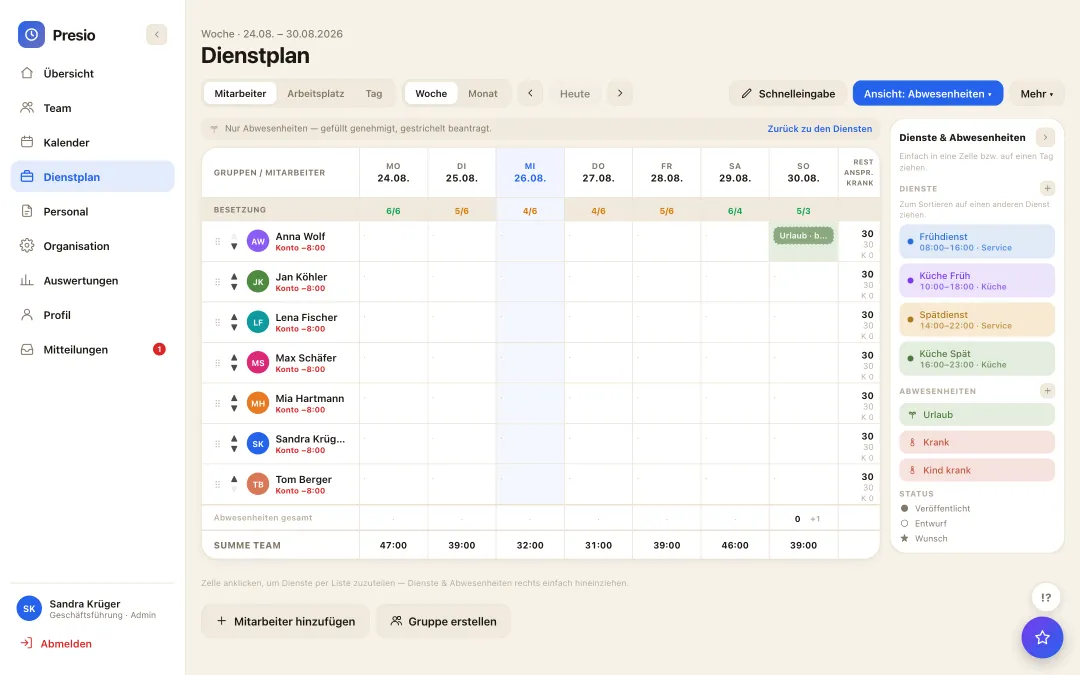
Custom view

Only absences - for annual planning

  • Reduced to the essentials: Shifts hidden, only vacation, sick leave & co. stay on the grid.
  • Remaining vacation in the totals column: visible per employee right next to the week.
  • Approved or requested: filled means approved, dashed means still open.
Abwesenheitssicht im Dienstplan: nur Urlaub, Krank und Co. mit Resturlaub je Mitarbeiter
Frequently asked questions

Quick answers

How are half vacation days calculated?

A half day deducts 0.5 days from the vacation account and halves the daily target - morning or afternoon, as requested.

What's the difference between time off in lieu and vacation?

Vacation draws down vacation days, time off in lieu draws hours from the time account - both are requested just as easily, in whole days.

Can we create our own absence types?

Yes - with your own name, colour, icon and effect (paid, unpaid, counts as vacation or not). Special leave and training are included out of the box.

The first time clock is running within ten minutes

Sign up, create your team, get started - try Presio free and with no obligation, no credit card needed.

Start your free trial