Features Recruiting & Contracts Shift planning Time tracking Absences & vacation HR & Payroll AI & communication Industries HospitalityHotel industryEvents & cateringRetailCar repair shops & dealershipsMedical practices & MVZPharmaciesClinics & care homesHome Care & Ambulance ServicesDay-care & social servicesConstruction & TradesManufacturing & logisticsFacility & Security ServicesMunicipalities & public utilitiesOffice & administration
More
Pricing Guides Careers Log in / Try it free
Language
DeutschEnglishFrançaisEspañolItalianoNederlandsPolskiPortuguêsČeštinaDanskSvenskaSuomiΕλληνικάMagyarRomânăБългарскиHrvatskiSlovenčinaSlovenščinaEestiLietuviųLatviešuMaltiGaeilge
Presio / HR & Payroll
HR & Payroll

From the first working day
all the way to payroll.

The digital personnel file keeps master data, contracts and roles in one place. At month-end, Presio delivers the finished payroll export for DATEV and Lexware - checked, complete, in minutes.

Try it free See the live demo No credit card · cancellable monthly · no setup fee
All features

HR management without a filing cabinet

Digital Personnel FileMaster data, contracts, personnel number, qualifications, start and end dates - all in one place per employee.
Roles & PermissionsOwner, manager, employee - everyone sees exactly what they're allowed to see. Cover arrangements with a defined period included.
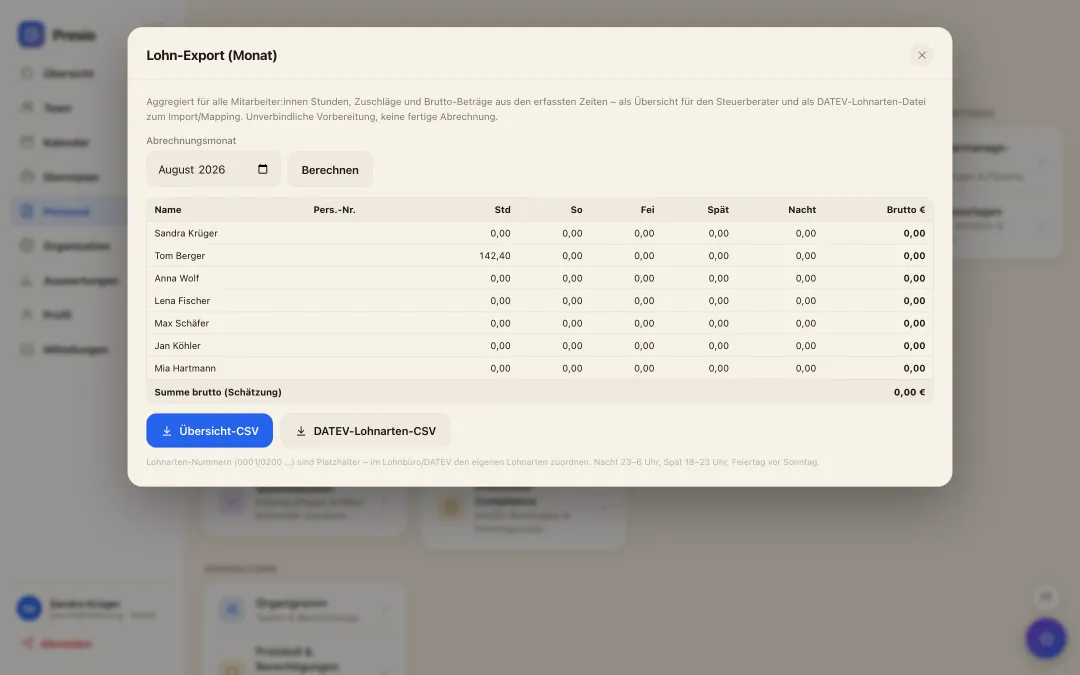
Payroll export for DATEV & LexwareMonthly figures per employee in the right format for your tax office - plus Excel and PDF, including break times.
Time sheet PDFA ready-to-sign time sheet for each employee and month - for audits and the archive.
Employee importAdd the whole team via file instead of one by one - Presio checks it and flags what's missing.
ReportsHours, overtime, absences and work locations by period - as a view and as an export.
PremiumsNight, Sunday, public holiday: standard rates or your own - the payroll export delivers the gross estimate per DATEV wage type.
Contracts & Employment TypesFull-time, part-time, minijob with weekly hours and vacation entitlement - target hours are calculated from that.
Working time complianceRest periods and maximum working hours under ArbZG kept in view - violations are reported before they get costly.
HR reportsMetrics, turnover and costs at a glance - and with „Ask your HR data“, the AI answers questions in natural language.
Org chartTeams and reporting lines as a diagram - who manages whom, at a glance.
Log & PermissionsWho changed what? The log shows it - permissions stay traceable.
Month-end close

Four steps, and payroll is fully prepared

  • 1Check missing clock-ins: the list shows open days - add missing entries in two clicks.
  • 2Decide on requests: work through open corrections and absences from the notification center.
  • 3Generate export: DATEV, Lexware, Excel or PDF - Presio remembers what's already been exported.
  • 4To the tax advisor: Send the file, done. If needed, we'll coordinate the format with your office.
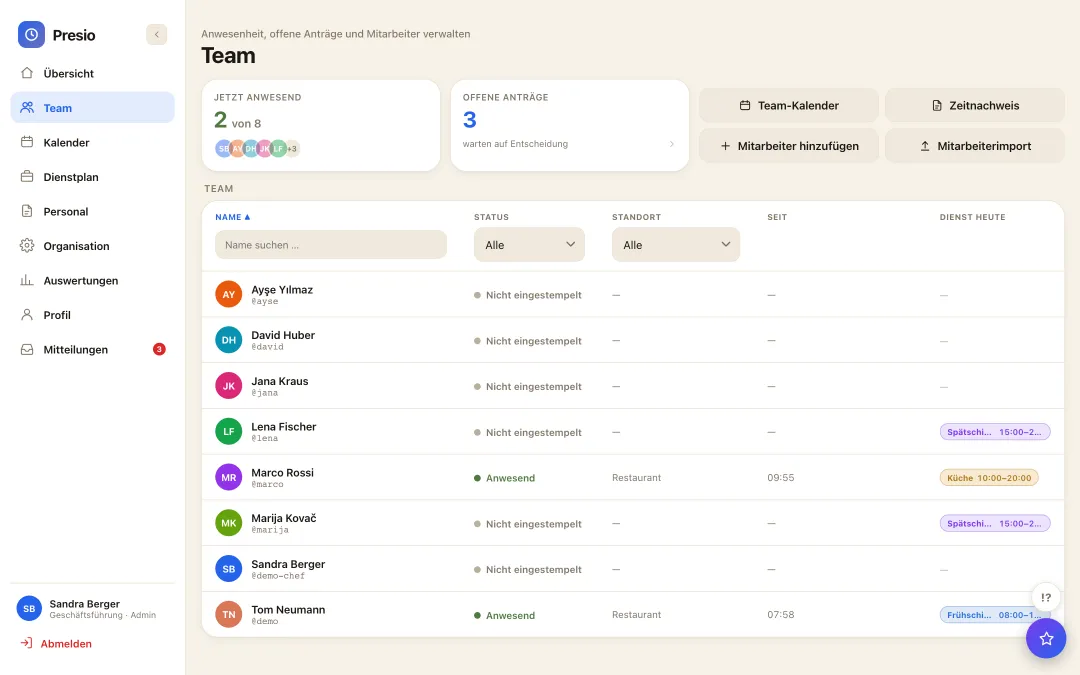
Teamverwaltung mit Anwesenheit, offenen Anträgen und Mitarbeiterliste
Lohn-Export mit Stunden, Zuschlägen und Brutto-Schätzung je Mitarbeiter als DATEV-Lohnarten-CSV
From the real product

One click, and payroll is prepared

  • All aggregated: Hours plus Sunday, holiday, late and night surcharges per employee for the chosen month.
  • Two formats: Overview as CSV for the tax office, or directly as a DATEV wage-type file for import.
  • Just a preparation: the gross estimate doesn't replace payroll accounting - that stays with your tax office.

From applicant to employee - without paper

The application link, pipeline, contract templates and legally valid e-signature all have their own page.

View Recruiting & Contracts
Frequently asked questions

Quick answers

Does Presio process payroll itself?

No, deliberately not: Presio fully prepares payroll and exports the monthly figures for DATEV and Lexware - your tax office still handles the actual payroll run, as usual. That way, responsibility stays where it belongs.

Who is allowed to see the personnel file?

Only owners and authorized managers. Employees see their own profile - colleagues' salaries and contracts stay hidden.

How do 50 employees get into the system?

Via employee import from a file - add, check, invite. We'll help personally to get you started, and on request even on-site in Munich.

The first time clock is running within ten minutes

Sign up, create your team, get started - try Presio free and with no obligation, no credit card needed.

Start your free trial