Features Recruiting & Contracts Shift planning Time tracking Absences & vacation HR & Payroll AI & communication Industries HospitalityHotel industryEvents & cateringRetailCar repair shops & dealershipsMedical practices & MVZPharmaciesClinics & care homesHome Care & Ambulance ServicesDay-care & social servicesConstruction & TradesManufacturing & logisticsFacility & Security ServicesMunicipalities & public utilitiesOffice & administration
More
Pricing Guides Careers Log in / Try it free
Language
DeutschEnglishFrançaisEspañolItalianoNederlandsPolskiPortuguêsČeštinaDanskSvenskaSuomiΕλληνικάMagyarRomânăБългарскиHrvatskiSlovenčinaSlovenščinaEestiLietuviųLatviešuMaltiGaeilge
Presio / Construction & Trades
Industry · Construction & trades

Time tracking
for Construction & Trades

Construction site, workshop, field service, changing crews: Presio records hours where the work actually happens - audit-proof under §2a SchwarzArbG and ready for payroll export.

Try it free See the live demo No credit card · cancellable monthly · no setup fee
Sound familiar?

Everyday life without a system

Weekly time sheet in the van

On Fridays, hours get reconstructed from memory.

Crew lists

The site foreman keeps lists, the office waits - and the month is already over.

Reporting deadline missed

The immediate notification for new hires is easy to forget - and gets expensive.

Presio turns every one of these points into a single step. Here's what that looks like:

Clock in on the go

Clock in where the work happens - with geofencing

  • Location detected: With geofencing, the app knows which construction site or route someone is clocking in at - the work location sets itself automatically.
  • Even offline: No signal on the construction site? Clock entries are saved and synced later.
  • Evaluable by location: The hours land in the report already assigned to the correct work location.

Tip: the clock-in button on the phone on the right actually works.

9:41
Hi, TomToday
Not clocked in
00:00Target: 8 hrs
Construction Site North - recognized as work location via geofence
Quick actions
Vacation
Sick
Work location
Correction
Overtime
Overview
Records
Request
Overview
Clock
Calendar
Profile
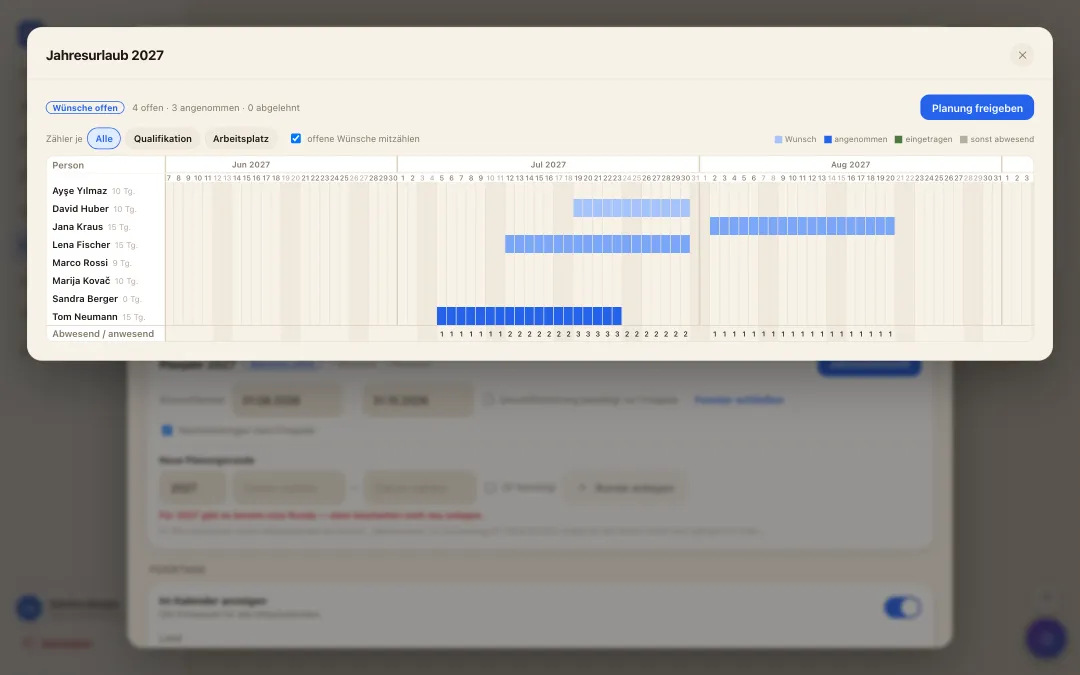
Jahresübersicht der Urlaubsplanung: alle Mitarbeitenden über das ganze Jahr, Wünsche als Balken und Zähler je Tag
annual vacation planning

A whole year of vacation - settled in one morning

  • Collect wishes instead of notes: While the wish window is open, everyone submits their periods for next year - with a priority and a reason, straight from the app.
  • Bottlenecks visible at once: The year overview shows for every day how many are missing and how many are in - optionally per qualification or workplace. Where it gets too tight, it turns red.
  • Release it, done: You drag periods with the mouse and release with a click - they become real approved vacation in the calendar. Late entries stay possible.
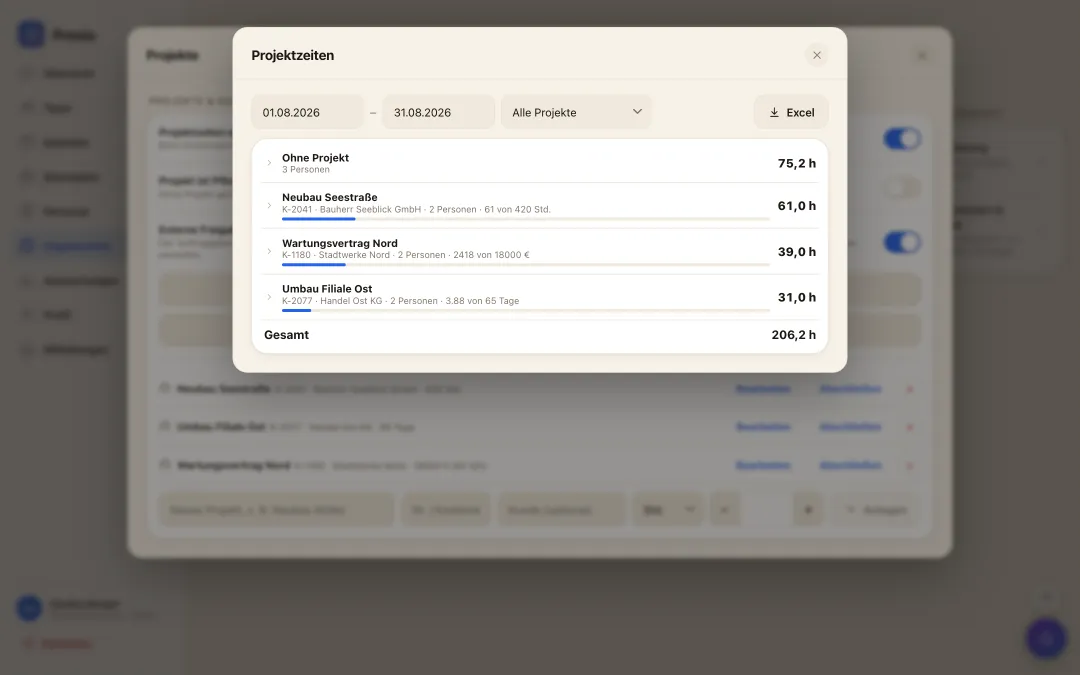
Project time tracking

Where the hours went - without guessing at month end

  • Picked when clocking in: Tap the project or cost centre when clocking in, switch it mid-shift, assign it afterwards - no second app, no paper slip.
  • Budget in view: Store budgets in hours, days, euros or FTE; the bar always shows how much has been used.
  • Ready for invoicing and costing: Hours per project and person, expandable down to the individual, exported to Excel.
Auswertung der Projektzeiten: Stunden je Projekt und Person mit Budget-Balken und Excel-Export
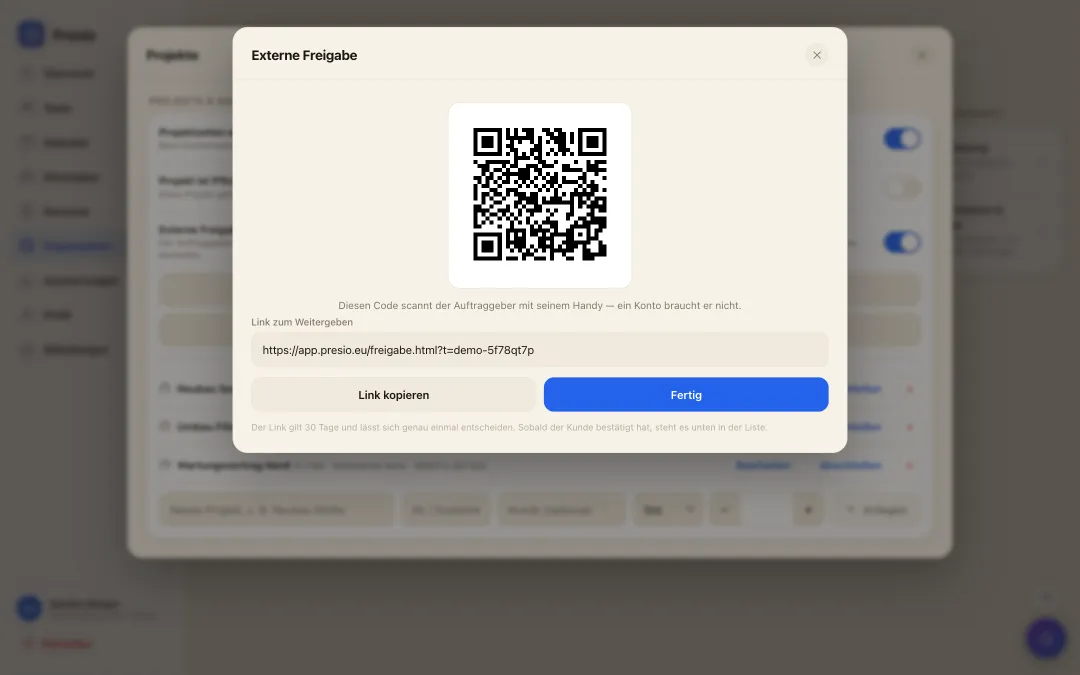
Externe Freigabe der Stunden: QR-Code und Link, den der Bauherr auf dem Handy scannt, samt Stundenaufstellung und Kosten
External approval of hours

The client confirms the hours right there on the building site

  • A QR code instead of a timesheet: You compile the recorded hours for a period and show the code. The site owner or client scans it - no account, no app, straight from their phone.
  • They see what they are signing: Person, day, hours, and if you want the euro amount per employee and trade. Approve or reject with a name and a note - recorded with the time.
  • The invoice at month end: The same hours become the monthly statement with an invoice total that goes straight to the client. No retyping, no arguing about hours.
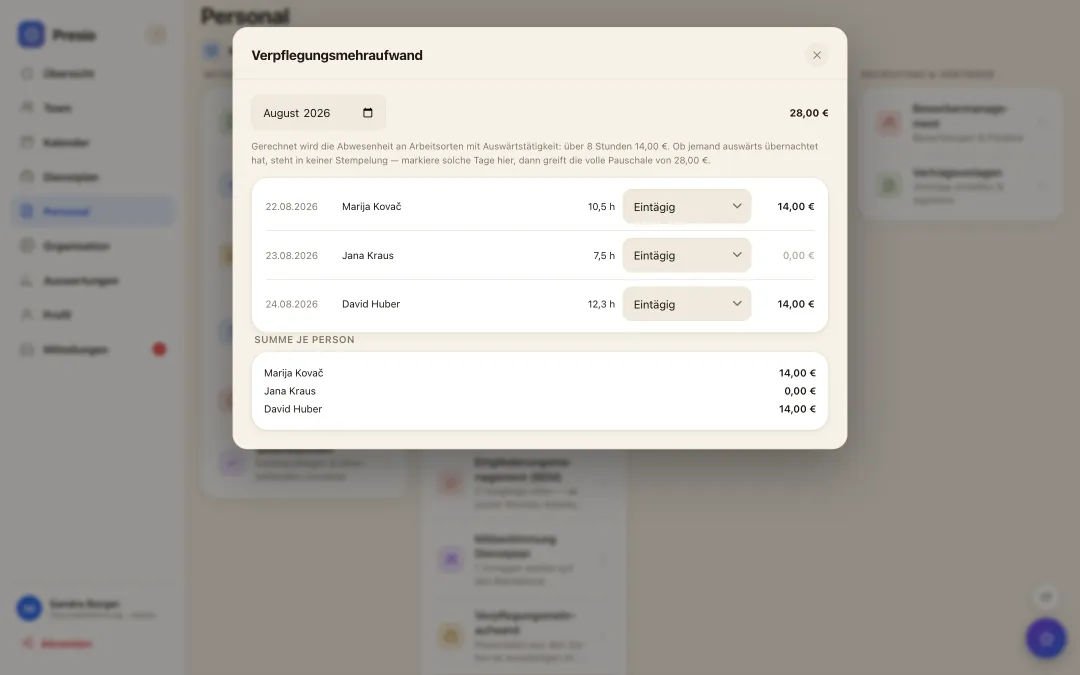
Meal allowance

The allowance works itself out

  • Derived from the recorded times: Work locations are marked as away; the time spent there yields the statutory allowance - over eight hours, per day and person.
  • Absence, not working time: Counted from the first clock-in to the last clock-out. Whoever leaves in the morning and returns in the evening gets the allowance even with a long break in between.
  • Honest about its limits: Whether someone stayed overnight is beyond any punch record. Mark such days in the same row - only then does the full daily rate apply.
Monatsübersicht der Verpflegungspauschalen je Tag und Person mit Summen
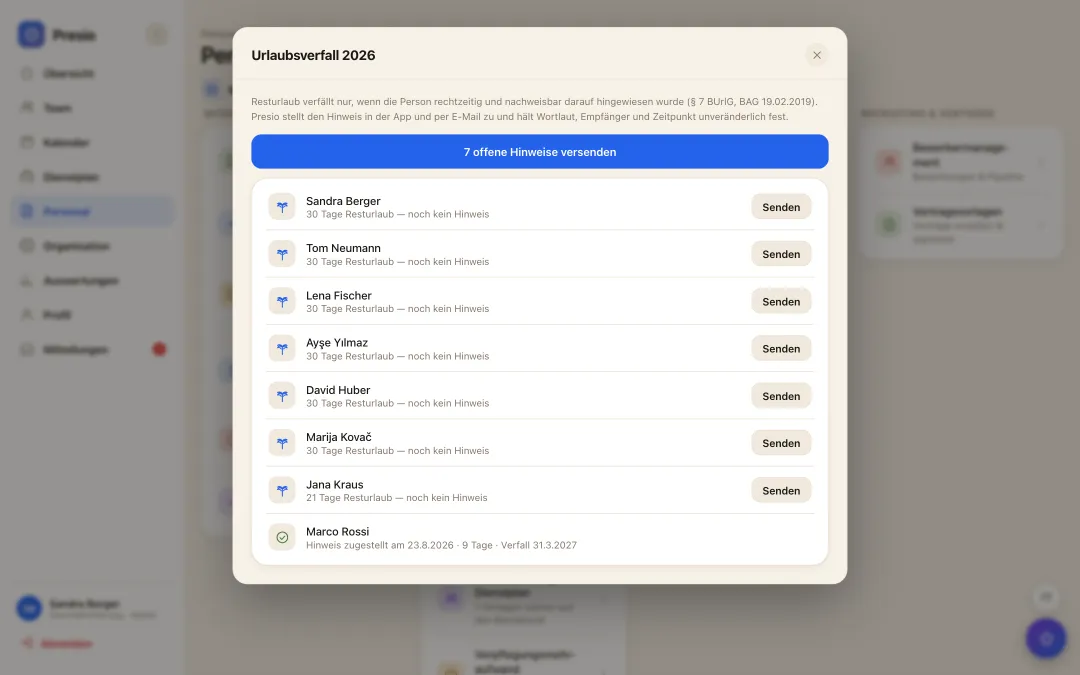
Liste aller Mitarbeitenden mit offenem Resturlaub und dem Stand der zugestellten Hinweise
Expiring leave

The notice without which nothing expires

  • No notice, no expiry: Since the European and Federal Labour Court rulings, remaining leave only expires if the employer gave a timely, individual and provable notice. Otherwise it adds up over the years - and is paid out on departure.
  • One click instead of a mail merge: Presio knows every balance, shows everyone with days left and delivers the notice: in the app and by email, with the exact number and the exact expiry date.
  • Evidence that stays: Wording, recipient, channel and time are recorded immutably. Evidence you can change afterwards is not evidence in court.
Why Presio is a good fit here

Made for your everyday work

  • Clocking in on the construction site: On your own phone, with work location - no more paperwork chaos in the van.
  • Crews & groups: Every crew or team is a group in the schedule; the foreman or supervisor sees their own people, the office sees everyone.
  • Sofortmeldung built in: Report new employees to social security right when they're hired - before the first hour starts.
  • Hours overview for the client: Clear hours overview per project or site - exported as PDF straight to the client for billing.
  • Project times: Choose the construction site or job when clocking in, switch during the day - hours per project for post-costing and time-and-materials billing.

All features at a glance

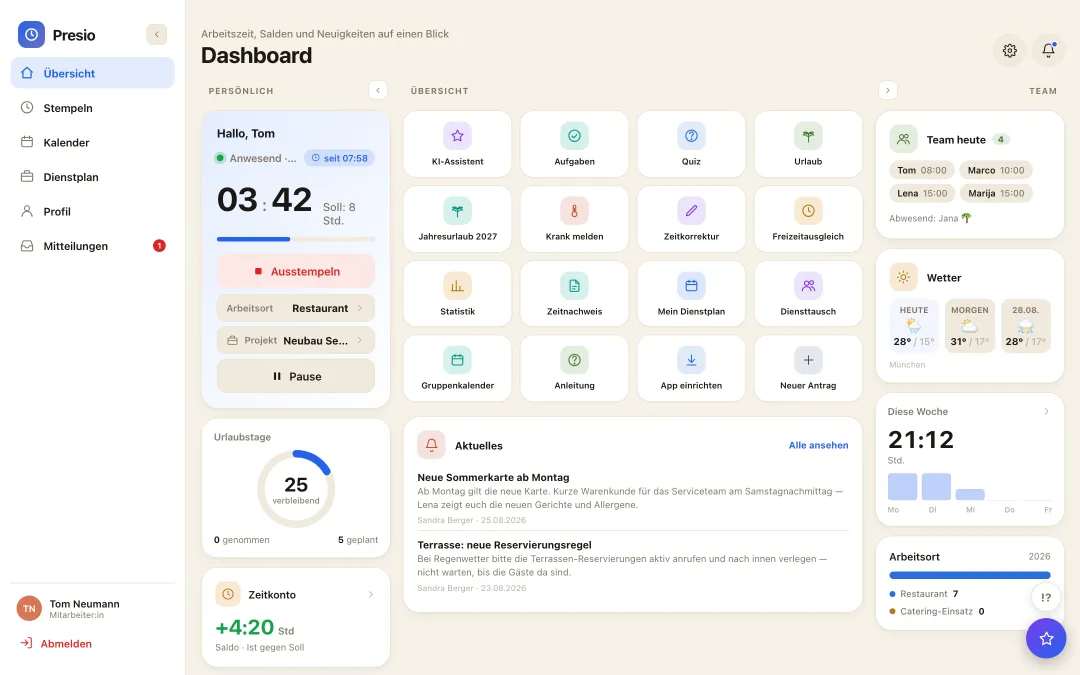
Presio-Dashboard mit Stempeluhr, Zeitkonto und Schnellzugriffen
Frequently asked questions

Quick answers

Does the Sofortmeldung obligation apply to us too?

On construction sites and in some trades, yes - that's why the SV-Sofortmeldung (immediate social security notification) is built directly into Presio when you add an employee.

What about apprentices and minijob workers?

Individual weekly hours, vacation entitlements and clock-in methods per person - even mixed within the same business.

The first time clock is running within ten minutes

Sign up, create your team, get started - try Presio free and with no obligation, no credit card needed.

Start your free trial