Features Recruiting & Contracts Shift planning Time tracking Absences & vacation HR & Payroll AI & communication Industries HospitalityHotel industryEvents & cateringRetailCar repair shops & dealershipsMedical practices & MVZPharmaciesClinics & care homesHome Care & Ambulance ServicesDay-care & social servicesConstruction & TradesManufacturing & logisticsFacility & Security ServicesMunicipalities & public utilitiesOffice & administration
More
Pricing Guides Careers Log in / Try it free
Language
DeutschEnglishFrançaisEspañolItalianoNederlandsPolskiPortuguêsČeštinaDanskSvenskaSuomiΕλληνικάMagyarRomânăБългарскиHrvatskiSlovenčinaSlovenščinaEestiLietuviųLatviešuMaltiGaeilge
Presio / Recruiting & Contracts
Recruiting & Contracts

From applicant
to the employee.

Applications come in through your link, move through the pipeline, the contract is generated from the template - and it's signed digitally, with a finger or mouse, straight into the PDF.

Try it free See the live demo No credit card · cancellable monthly · no setup fee
To try out

Try signing - just like in the real contract window:

Sign with your mouse or finger.
All features

Hire without touching paper

Public application linkOne link - on your website, on a poster, as a QR code. Applicants fill out the form without logging in, in any of 35+ languages.
Application pipelineAll applications with status in one place - from the initial submission through the interview to hiring.
Email templatesInterview invitation or rejection: ready-made, customizable templates - polite, fast, consistent.
Contract templatesCreate employment contracts from templates - the person's master data is filled in automatically.
E-signature in the PDFSign with your finger or mouse, on your phone or computer - the signature is embedded in the PDF with name and date.
Self-serviceNew employees fill in their own details - tax ID, social security number and bank details land straight in the file.
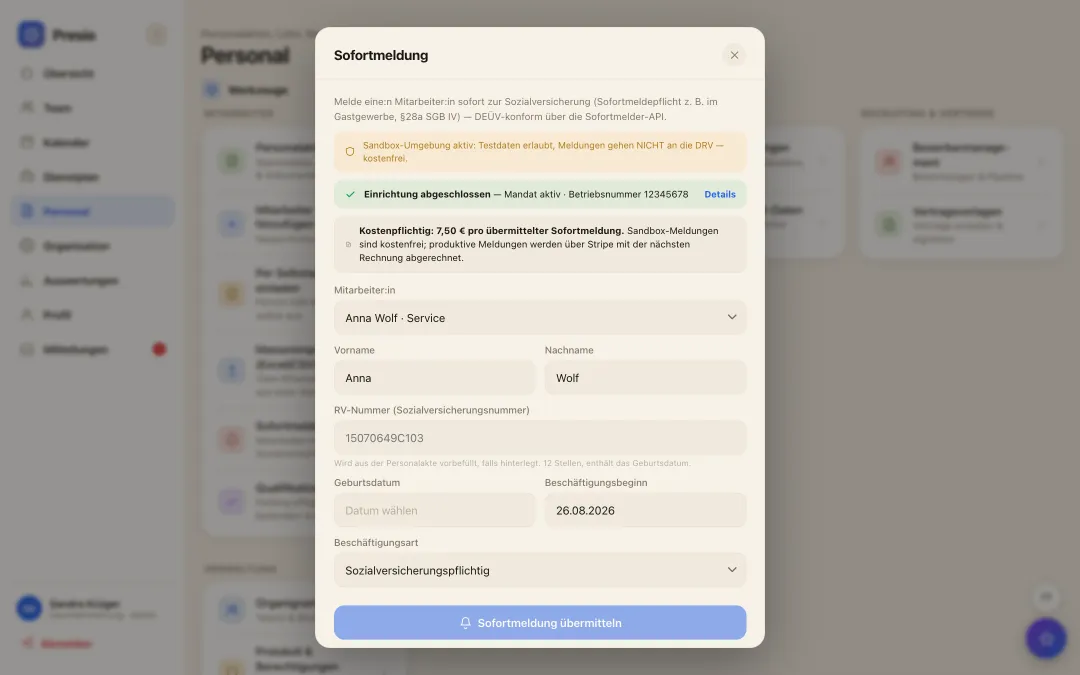
SofortmeldungFor sectors with a reporting obligation: the SV-Sofortmeldung filed right when the employee is added - before the first hour is clocked.
Documents & instructionsContracts, certificates and infection-control briefings (§43 IfSG) in the personnel file - with an overview of due dates.
Self-service & Sofortmeldung

Type it once, never retype it again

Otherwise, new employees fill out a self-disclosure form by hand, someone types it up for the tax office, and the Sofortmeldung goes out separately. With Presio, the person enters their own data - directly into the personnel file, without the detour via paper or a tax advisor.

To try out

* Required field

Enter the details and transfer them - just like a real self-disclosure form.

Sofortmeldung an die Rentenversicherung mit aus der Personalakte vorausgefüllten Daten
Sofortmeldung

Registered with social security, at the push of a button

  • Auto-filled: First name, last name, social security number and date of birth come straight from the personnel file.
  • DEÜV-compliant: For industries with immediate-registration duty like hospitality or construction - directly via the Sofortmelder API.
  • Billed transparently: A fixed price per registration - no surprises on the bill.
How hiring works

Four steps from application to first clock-in

  • 1Application comes in: via the link - with all the details, straight into the pipeline.
  • 2Interview & offer: Invitation via template, decision with one click.
  • 3Contract & Self-Service: Fill in the template, sign digitally, the data fills itself in.
  • 4Sofortmeldung & go: registered with social security, PIN assigned - the person can start clocking in.
From the real product
Email template “Invitation to interview”
Hi Marija,

thank you for your application. We would love to meet you in person. Please let us know a few dates that work for you.

Best regards
Trattoria Beispiel

Templates are customizable - Presio automatically fills in the name and business.

Frequently asked questions

Quick answers

Is the e-signature legally valid?

In Germany, employment contracts generally only require text form - an electronic signature with name, date and embedded signature documents the conclusion of the contract cleanly and verifiably. For special cases (e.g. fixed-term contracts), we recommend coordinating with your legal counsel.

Where does the application link appear?

Wherever you like: on your website, in job ads, as a QR code in the shop window. The link leads to a form under your name - no login required for applicants.

What happens to rejected applications?

Send a rejection using a template and close the application - keeping the pipeline tidy and every application answered.

The first time clock is running within ten minutes

Sign up, create your team, get started - try Presio free and with no obligation, no credit card needed.

Start your free trial